There are probably thousands of people with blogs and web sites that are trying to make a lot of money online. There are many avenues, some good and some bad, that you can take that will help you achieve your goal. The problem, however, is that most people take one of the bad avenues and think that making money online is quick and easy.
This week I review a blog where someone is trying to make a certain amount of money, whether it is online or offline. Although, once you look at the blog you may think the author is trying too hard.
I have dealt with many hard drive failures in the past, and most of the time it was the result of bad sectors. Other times it was a complete failure where the hard drive wouldn’t even power up. In the latter instance there isn’t much you can do to retrieve your data.
As for bad sectors, you may still be able to retrieve your data, if you have the right tool. It is difficult to copy data from a damaged hard drive, especially in Windows since it would usually stop the copy when it encounters a bad sector. Recently, I managed to retrieve over 5GB of data from a hard drive with many bad sectors, and in this post I’ll tell you how I did it. (more…)
This post will continue the steps that I took to convert my Blogger blog to a WordPress blog. In Blogger to WordPress – Part 1 I talked about installing WordPress on your local machine. This was done to help you learn WordPress and practice importing your Blogger data.
In this part I will talk about domain names and hosts, what they are and how they will be used during the conversion.
In the first part I discussed installing WordPress on your local machine, and importing your Blogger posts into WordPress. From there, I talked about purchasing a domain name, and a host in part 2 of this series.
If you have been looking at WordPress on your local machine you have probably come across plugins and themes. You may have figured out what they are, but if you haven’t, I will discuss them in this post. (more…)
There is always much talk about nofollow and dofollow links on web sites. Much of the discussion is about whether you should make a link nofollow. For blogs, this discussion is centered more around the links in the comments of a blog post. Many visitors may leave a comment in an effort to get a free link back to their blog with a dofollow comment link.
In WordPress you have plugins that can control whether a link in the comments is nofollow or dofollow. In Blogger blogs, however, the default is to use nofollow links in the comments of the posts. In this post I will explain how to change the comment links in a Blogger blog to dofollow, if you would like to make the change.
Two of the most popular posts on Technically Easy has to do with securing two different wireless routers: the Linksys WRT54G Wireless-G router and the D-link DI-524 Wireless router. At this time I only have those two guides available on securing wireless routers.
For those with other wireless routers, I decided to outline some of the security settings you can enable, if available, on your wireless router to make it secure.
The most popular posts on Technically Easy has to do with resetting a wireless router, and securing a wireless router. Securing a wireless router can be confusing and difficult, and can offer a few headaches. Many people have e-mailed me, or left comments, about problems that they have had when securing their router. While I try to answer all, there are a few that I have trouble finding a solution for.
In this post, I will offer an answer to one of the comments that someone had posted about a “level_15_access” message they were getting when logging into their router. I have finally found an answer to this problem, which is explained below.
The Level_15_Access Issue – Related to IP Address
When securing a router, you are required to get access to the router’s administrative pages through a web browser. You type in a user ID and password to gain access to these pages.
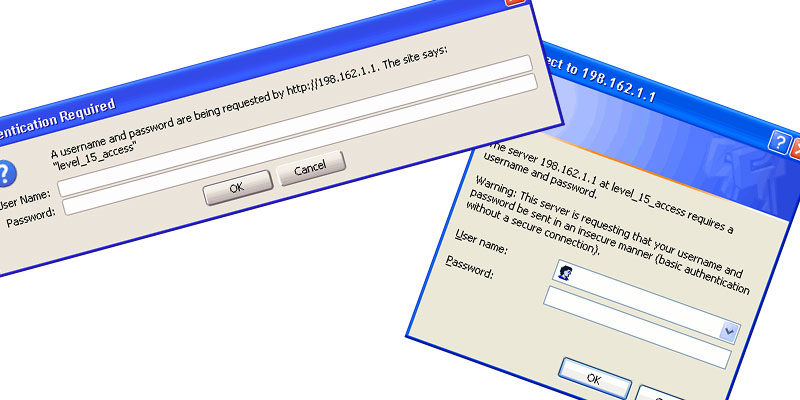
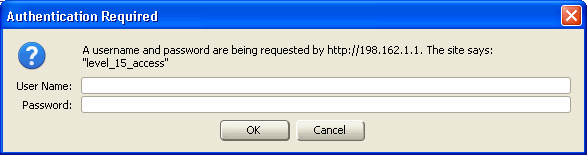
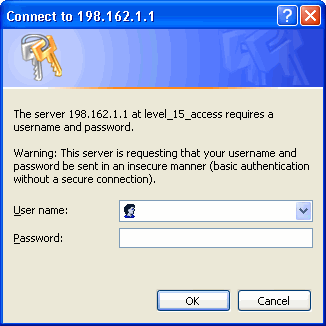
The steps that I offer when securing a router requires you to log in a few times. When logging in, you may receive a message similar to the following:
Firefox – Level_15_Access Internet Explorer – level_15_access
The above problem is not related to your router, but is a result of entering in the IP address incorrectly. You will notice that in the above screenshots, the IP address is 198.162.1.1. This is not the address of your router. This is the address of another server somewhere on the Internet, which explains why your ID and password don’t work.
The address that you should enter in your web browser is 192.168.1.1. Once you enter in your ID and password, you should have access to the administrative pages of your router.
When I visit web sites I notice many of them are offering e-books. These are usually books in a PDF format that can be downloaded and viewed with a reader. The most popular reader is Adobe’s Acrobat Reader. The once nice thing about PDF documents, and probably the reason they were chosen for e-books, is that the document will look the same regardless of the reader’s computer. Other formats, such as Microsoft Word, may look different depending on whether the reader has the same fonts installed.
Many tools that are used to create a PDF document cost money, but I use a tools that is free. So if you are interested in creating your own e-book, or would just like to create a PDF document, then I’ll talk about the tool you can use for free with pretty much any application.