Search results for: “label/Web%20Site%20-%20Design”

  • Why the Length of the WPA Passphrase is Important

    Why the Length of the WPA Passphrase is Important

    One of the most common issues that my visitors contact me about is that they have difficulty saving the passphrase for their WRT54G wireless router when securing the router with WPA. Many times the problem is resolved once they use Internet Explorer instead of another web browser. Other times, however, switching browsers may not even correct the problem.

    With web browsers such as Firefox and Chrome, you have the ability to install add-ins to change many settings and functions within the browser. At times, certain add-ins can interfere with the router’s administrative pages, resulting in settings not being saved or message boxes from appearing. A recent commenter in my explaining how to secure the WRT54G wireless router pointed out that there is a minimum passphrase length, but many people may not receive a popup message, which can lead to confusion and issues. For the WRT54G, the minimum length is 8 characters , and the maximum is 63 characters. When it comes to a passphrase, you should definitely go longer than the minimum of 8 characters. Let’s look at why the passphrase, and its length, is important when securing a wireless router.

    (more…)

  • Staying Safe By Understanding Desktop Security

    Staying Safe By Understanding Desktop Security

    If you are just getting started with the use of a home computer, you have no doubt heard of the various types of malicious software that can be used to infiltrate your system. This type of unwanted programming is commonly known as malware, and is used by unscrupulous individuals trying to gain access to information stored on your computer, mostly for the purpose of sending you bothersome amounts of advertising. In other cases however, it can be an attempt to steal your personal information. Desktop security is therefore a priority.

    Exactly What Is Malware?

    Lock

    Malware is an abbreviated version of “malicious software”, and refers to such infectious programs as spyware, adware, tracking cookies, and computer viruses. Spyware is used to record your internet connections activity and can actually direct your web connection to another computer without your knowledge. Tracking cookies record your web browsing history and can be used to put you on ridiculous e-mail lists, resulting in a large volume of incoming spam. Viruses can introduce keylogger commands that record every keystroke you make, including the entering of passwords and credit card numbers. They can also freeze your system after commanding your computer to upload your documents to another system.

    Antivirus Programming Is Important

    If you purchase your computer in new condition from a retailer, it will often come with a subscription or free trial offered by a computer security company. These subscriptions allow you to run security scans on a schedule and personalize other settings that check for various types of malware. These companies regularly update their information concerning new viruses and other forms of malware, and relay that information to your computer so that it is constantly protected. If your computer purchase does not include an antivirus subscription for desktop security, then it is highly suggested that you purchase one, either from a retailer, or in a downloadable form from an internet security company website.

    Other Security Measures You Can Take

    There are a few simple routines you can take to help with desktop security, and these should be done in addition to having an antivirus program installed. Most internet browsers have a special window that you can open up for the purpose of deleting your browsing history or removing all tracking cookies. You can also enable a firewall that will not allow a hacker to transfer your information to his/her computer. Most browsers also contain an optional popup blocker. Popups are usually filled with tracking cookies, as these advertisements are meant to install programming on your computer even if you do not buy anything.

    There’s no need to panic of feel insecure while online. Having an antivirus program coupled with your own maintenance regimen will go a long way towards keeping your computer safe.
  • 3 Best Current Laptops of 2011

    3 Best Current Laptops of 2011

    The lines between PC, laptop, netbook, smartphone, and eReader have all begun to merge over the past two years. Consumers are no longer satisfied with single-task machines and require top quality entertainment, computer processing, long battery life, and complete portability.

    Companies have taken the hint and recreated their outlook on the entire laptop market. Here are the three best laptops coming out in 2011:

    (more…)

  • LastPass – The Ultimate in Password Protection

    LastPass – The Ultimate in Password Protection

    I recently needed a way to manage my passwords, and decided to give LastPass a try. A few months ago I was tired of remember my passwords, and on top of that I wanted to create more unique passwords. You probably know how hard it is to keep passwords straight for many applications, so I began search for a password management solution.

    After doing some reading I discovered a tremendous service called LastPass. For the past few months I have been using this service I have been impressed with how well it manages my passwords, and makes it very easy for me to login to various locations with different passwords.

    (more…)

  • How to Promote a Brand Effectively

    How to Promote a Brand Effectively

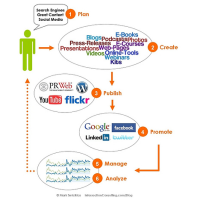
    If you’ve got your brand set up, are offering a great service and have plenty of pleased customers but are wondering why your client base hasn’t grown, perhaps it’s because you need to do some effective brand promotion.

    (more…)

  • YubiKey – The Key to Online Security

    YubiKey – The Key to Online Security

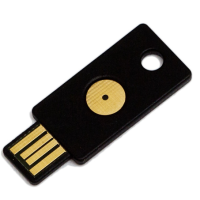
    I am constantly looking for ways that I can remain as secure as possible while online, and YubiKey seems to be a great addition to my security procedures. The one thing that I have been doing is creating secure passwords for all my online identities. I am currently using LastPass to manage my passwords, and it has made my job of managing passwords so much easier.

    About a month ago I have also learned about a product that will help make some of my logins even more secure than just a good password – the YubiKey. What is this product, and how does it work? Let me explain.

    (more…)

  • Online Security: Be Smart and Stay Safe

    Online Security: Be Smart and Stay Safe

    Online security is something that is in the back of many people’s mind when they access the Internet. Many people may not perform financial transactions online because they fear those transactions could be compromised.

    While not everyone is comfortable performing transactions online, those that do need to ensure they take every precaution to avoid losing money, their identity or more while online. Below I list several steps that you can take to ensure you remain vigilant and stay safe while online.


    Online Security: Be Smart and Stay Safe

    1. Use a more secure DNS server.

      When someone accesses the Internet from my home, they are restricted to what websites they can visit. While I don’t stop people from visiting popular sites such as Facebook or YouTube, I do prevent them from visiting known phishing sites or torrent sites. My network, my rules.

      If you have children that access the Internet from your home, you may want to look into restricting sites via your DNS connections in your router. You can do this by pointing the DNS settings to OpenDNS, and then restrict the sites that you don’t want someone visiting via your Internet connection.

      By using more secure DNS servers, anyone accessing your Internet connection will be prevented from visiting malware, phishing or illegal sites. The only way somone can get around this protection is to stop using your router to access the Internet.

      I talk about how I secure my Internet connection by changing DNS servers, and how it works to keep my Internet connection secure.

    2. Always use unique long passwords.

      Most people will probably use the same user name and password for all websites that require registration. This makes life easier for them as it doesn’t require them to remember many different passwords.

      For hackers, all they would need to do is figure out a password for one site, and then use that same password for other sites. If you also use the same user name, then many of your online accounts could easily be compromised.

      The best method of avoiding such a problem is to use long (12+ characters), and unique passwords for each site. I talk about using LastPass to manager your passwords in a previous post.

    3. Where available, use two-factor authentication.

      This idea is probably new to most people. The basic idea behind two-factor authentication is using two pieces of information to authenticate your login on a website.

      We are all familiar with entering a user name and password to authenticate. Two-factor authentication will add an additional authentication method in addition to a user name and password. YubiKey enables two-factor authentication, and I currently use it today.

      By enabling two-factor authentication on websites that allow it, you make it harder for someone to access your account. While someone may know your user name and password, the won’t be able to bypass the additional authentication factor.

    4. Don’t ignore browser warnings.

      Every modern web browser displays warnings if it detects an issue with the site. Everything from invalid security certificates to known phishing sites will produce a warning message in the browser window.

      It is important for you to understand these messages, and determine the proper course of action to take. Simply ignoring such message could compromise your personal information.

      On a related note: no financial institution will ask for your personal information through e-mail. This message has been repeated countless times online, but unfortunately people still access phishing sites through e-mail. If you get such an e-mail, delete it and don’t click through the link within the message body.

    5. Only enable Javascript for trusted sites.

      Javascript executes on your local system, so many people have figured out how to use Javascript to do harm. The best defense against this is to disable Javascript for all sites, and only enable it for when you really need it.

      Fortunately, there are web browser plugins that can help you with this chore. NoScript for Firefox is probably the most popular one that allows you to selectively enable Javascript for each site. By using this plugin, you will receive a message that certain scripts have been disabled. You can then enabled the scripts, if you trust the site that you are visiting.

    The real key to staying secure online is to use common sense. By using common sense while online, you can prevent many of the problems that could occur while you are visiting sites online.

  • Schema.org – Does it Provide a New Structured Markup Language For All Websites?

    Schema.org – Does it Provide a New Structured Markup Language For All Websites?

    It has been several weeks now since Google, Microsoft and Yahoo! introduced schema.org to webmasters. Schema.org provides information regarding the structure data markup language that has become an initiative for the three big search engine companies. While the new structure markup language does seem intriguing, it remains to be seen how various webmasters will take to the new markup.

    Google introduced rich snippets in 2009 to provide a better way of structuring data on a web page. Once specific markup was added to an HTML page, Google would parse the page and provide an enhanced search result in its search results page. With Schema.org, Google has now come together with Microsoft and Yahoo! to provide a more uniform structured markup language for webmasters.

    (more…)