LastPass – The Ultimate in Password Protection

  • Buffer
  • Pin It
  • Sharebar
  • Buffer
  • Pin It

I recently needed a way to manage my passwords, and decided to give LastPass a try. A few months ago I was tired of remember my passwords, and on top of that I wanted to create more unique passwords. You probably know how hard it is to keep passwords straight for many applications, so I began search for a password management solution.

After doing some reading I discovered a tremendous service called LastPass. For the past few months I have been using this service I have been impressed with how well it manages my passwords, and makes it very easy for me to login to various locations with different passwords.


lastpass logo 256x256 LastPass   The Ultimate in Password Protection

The Complete Password Management Solution

Probably the most popular password manage is Roboform, which I tried briefly but never really used. Roboform did cross my mind as a solution, but then I signed up and began using LastPass. I haven’t looked back.

First, LastPass isn’t complicated to use, and stores all your data in a secured online vault that only you can access. You can access the vault (and your data) either by logging into their website or using a browser plugin. You can even access you LastPass vault from many different mobile devices. More on that later.

With the web browser plugin, you can easily sign up with a website, and login to a website by clicking a button. When you signup, LastPass will detect that you have just entered your user name and password, and then ask you if you would like to save the current login information to your vault. If you save the site, the user name, password, and URL are stored in the vault.

When you log in to a site, you can autofill the user name and password information on the form and then log in. No more needing to remember an ID or password.

This was just a quick overview of how LastPass can help you manage your login information, let’s look at some of the features included with LastPass.

Features of LastPass

In addition to managing logins, LastPass also includes the following features:

  • One master password that provides access to your secured information. You simply provide your LastPass password – either on their site, a mobile device, or web browser with the plugin, and you have access to your secured vault.
  • Automatically store login information and automatically fill in forms. This was talked about above, but you no longer need to type user names and passwords, if you wish.
  • Store notes securely. Not only can you store user names and passwords for sites, you can also write notes and keep them securely in your vault.
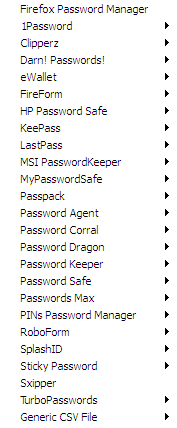
  • Import from other password management systems. The number of other password systems that you can import your data from is very large. The image below shows you the import menu options.
  • lastpass import options 105x256 LastPass   The Ultimate in Password Protection

    LastPass - Import Options
    (Click to enlarge)

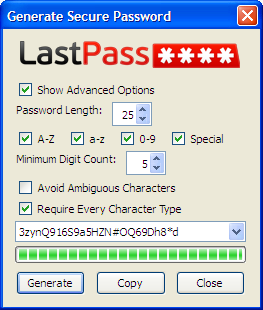
  • Generate secure passwords. LastPass includes a tool that you can use to generate a password of any length, and contain any type of character. I use this tool often when signing up with a new site.
  • lastpass generate secure password tool 217x256 LastPass   The Ultimate in Password Protection

    LastPass - Generate Secure Password Tool
    (Click to enlarge)

  • You can backup and restore your secured data. This is in case you would like to take a backup of your data for safe keeping.
There are many more features of LastPass (too many to list), but in addition to these features, LastPass also provides support for a wide range of devices.

Use LastPass Anywhere

LastPass is one of those services that you can use pretty much on most devices and operating systems. From mobile devices to desktops, you can access your LastPass vault anywhere and anytime.

LastPass can be used with the following:

  • Microsoft Windows – Internet Explorer 6.0+, Firefox 2.0+, Chrome 4+, Opera 11+
  • Apple Macs – Safari 3+, Camino 2+, Firefox 2.0+, Chrome 4+, Opera 11+
  • Linux – Firefox 2.0+, Chrome 4+, Opera 11+
  • Apple iPhone – iOS / iPhone OS 3.0+
  • Applie iPad – iOS / iPhone OS 3.2+
  • Google Android – Google Android 1.5+
  • RIM Blackberry – BlackBerry OS 4.2.1+
  • Microsoft Windows Phone – Windows Phone 7+
  • Microsoft Windows – Windows Mobile 5+
  • HP Palm – Pre, Pixi, Palm Pre Plus (HP webOS 1.0+)

As you can see, pretty much any popular operating system and device is supported by LastPass.

How Much Does It Cost?

This is always a sticking point for many people. The good news is that you can use LastPass for free. There is also a premium service for $1 per month, which is still really cheap, especially for the service that you will get from the service.

I am currently using the Premium service, for two reasons: 1. $1 a month ($12/year) isn’t expensive, and 2. I wanted to support the service.

In case you are curious, you can view a comparison of LastPass features.

If you are looking for a way of managing your passwords, I highly recommend you look at LastPass.

 LastPass   The Ultimate in Password Protection

About Paul Salmon

Paul Salmon is the founder of Technically Easy. He is a an experienced PC user, and enjoys solving computer-related problems that he encounters on a regular basis.

Facebook | Twitter | Google+

Tags: , , ,

You may also like:

Key

Password Storage Solutions – Why You Need One

No thumbnail image

Default User ID and Password for Various Routers

Increase Online Privacy and Protection: Top Add-ons for Mozilla Fire Fox 4

Increase Online Privacy and Protection: Top Add-ons for Mozilla Firefox 4

steganos-locknote-252x300

Keep Your Passwords Secure with LockNote

19 people had something to say about “LastPass – The Ultimate in Password Protection”:

Comments


  1. Wow that’s a good price because RoboForm charges about $40 now to save your pass codes.

    “Black Seo Guy “Signing Off”
    TrafficColeman recently posted…Meet The Super Black Seo Guy In 3DMy Profile
    Twitter:


    • I thought so too about the price. What can you get for $1 nowadays anyway? I know, a great password management service.


  2. Great article, I also use lastpass for Google Chrome and it is a great piece of software. My only complain is that it can be a little bit annoying when it tries to remind me if I want to save a password, but this is just my experience using it with Chrome, over all it is awesome!

    Keep up the great work!
    Pit recently posted…Add mysterious and beautiful abstract designs with Diffusion theme for Windows 7My Profile
    Twitter:


    • I agree the the messages, it can be a little annoying, especially if you may not want to save the passwords. I guess it is a small price to pay for such a great product.


  3. Wow, I can’t believe it. lastpass can be used now everywhere. I love it!, I used lastpass when I get hired from my boss, last month, He recommend me that software, and Its definitely great,.I still used it until now, recently I used roboform,.now lastpass is the best..
    Conde recently posted…Using Free Methods To Drive Traffic In Internet Marketing- The Pros And Cons Part 1My Profile


    • I am really surprise with how many devices are support by LastPass myself. As I had mentioned I gave RoboForm a quick try, but I didn’t feel comfortable with it.


  4. We use Lastpass for all of our company devices, and you’re right, it’s hugely powerful. We were all struggling to remember passwords, and writing them down just wasn’t secure.
    Alex recently posted…We Switched to Microsoft Exchange Online and Your Small Business Should- TooMy Profile


    • I struggled with remembering passwords myself, which is why I’m glad I found LastPass. Now I can make passwords as complex as I like without having to worry about remembering them.


  5. Lastpass is really a nice feature to have.It will ease out the problem of remembering so many passwords.But I am concerned about the privacy policy of this service.?
    Shivam Garg recently posted…TypePad Discount CodeMy Profile


  6. Oh man, I would never use any of those programs, not that I’m saying it’s not safe, but I just don’t want to rely on software for my passwords. What if one day, the program required you to pay money to regain your access to all the data, oh that’s just…:S


    • Actually, there are two options for LastPass: free and premium. The Premium version costs $12/year. You can also export all your passwords to a file so you can always store them outside of the application as well.


  7. I used to use Clipperz.com to manage all passwords and remote login information but LastPass has by far a better Chrome extension and auto complete capabilities as well as making it easier to automatically add new forms.

    One thing I learned though is be choosy when to set the “auto login” flag, as sometimes you may want to use different accounts to login to the same site and can shoot yourself in the foot by trying to save time :)
    Justin Germino recently posted…Movie Review- I Saw the Devil – Unrated 2011My Profile
    Twitter:


    • I like the ease of use of LastPass, which is why I finally decided to use a password manager. I never used one in the past because of the cost, and/or the confusing UI.

      The autologin can be a pain for some sites, as you mentioned, that use different accounts. For example, I have two accounts for Facebook (one personal and one for my blog), so I don’t enable autologin for that site, but I may for the lesser important sites where I only have one ID.


  8. You’re right, $1 is not much to support such a program. The sad truth is we all need to use programs like this if we don’t want to end up one day with our passwords stolen. It’s getting more and more dangerous online.
    Amit recently posted…How to Get a Forklift LicenseMy Profile


    • Hi Amit, $1 is a great prices for such a great service. It has come to the point where using a password management tool is almost a necessity to manage all the passwords that we need to remember.


  9. Hi. Thanks for sharing this. I never tried this yet. I’m going to give it a shot later on. Thanks!
    Andrew Walker recently posted…TSC Shops Coupon CodeMy Profile


  10. A nice piece of software which offers lot of features. But the LastPass Master Password is kind of a single point of failure. If you forget it you’re lost!


    • That is true, but there are ways of recovering your password. LastPass provides a few steps that you can do to recover your account – although they can’t recover your password since they don’t know what it is – they don’t store it anywhere.

      The password recovery steps are located on the help center page:
      I forgot my Master Password, how do I recover access to my account?
      .

Do you have something to say? Let everyone know!

Commenting policy: All comments are moderated for spam. You must use your real name and not your website name or keywords. If a comment is deemed to be spam, then it will be deleted or edited. Links to your website within the comment body is not permitted, but you are free to use CommentLuv to add a link to your latest post. If you wish to add a link to your website, you can always contact me about submitting a guest post.


CommentLuv badge
This blog uses premium CommentLuv which allows you to put your keywords with your name if you have had 5 approved comments. Use your real name and then @ your keywords (maximum of 3)

Previous Post:

Next Post: