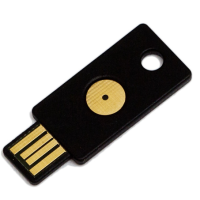
I am constantly looking for ways that I can remain as secure as possible while online, and YubiKey seems to be a great addition to my security procedures. The one thing that I have been doing is creating secure passwords for all my online identities. I am currently using LastPass to manage my passwords, and it has made my job of managing passwords so much easier.
About a month ago I have also learned about a product that will help make some of my logins even more secure than just a good password – the YubiKey. What is this product, and how does it work? Let me explain.

The Key to Online Authentication
A YubiKey is the core product from a company called Yubico. The YubiKey was invented in 2006 by Stina and Jakob Ehrensvärd. To bring the YubiKey technology to the market, Yubico was then founded in 2007. The company, itself, includes Internet security and sales professionals that have a proven track record.
As for YubiKey, it is a hardware authentication token. It looks like a USB memory stick, but when it is connected to a computer (through a USB port), it is installed as a keyboard.
There is a single button on the YubiKey that when pressed will send a time-sensitive, unique code to an application. Each time the button is pressed, a new code is sent.
The best part about the device is that it requires no software to be installed to function. It can work with pretty much any client application – from web browsers to installed applications – on all platforms. The reason for this is because the YubiKey is installed as a keyboard, so by pressing the button on the YubiKey is just like pressing a button on a keyboard.
How does a YubiKey provide better online security?
Two Factor Authentication With YubiKey
There have been countless stories online about someone’s account being hacked on a website. Many times the hacker has actually used the victim’s user ID and password to login and perform destructive actions. With a YubiKey, it adds another layer of security to a standard user ID and password authentication.
Let’s look at an example using PayPal. PayPal uses an e-mail address and password for login. An e-mail address for someone is easy to find, and if they also use a weak password, then perhaps the brute force method of getting the password will work. If that is the case, then with both the e-mail address and password, someone can get into someone else’s PayPal account. Not good.
To add another layer of protection to your PayPal account, you would first purchase a YubiKey (one-time fee of $25), and then setup your PayPal account to use the YubiKey.
The next time you log into PayPal, you would provide your e-mail address and password as previously. Once you click “Login”, PayPal will then prompt you for your YubiKey unique code. You simply insert your YubiKey into a USB port on your computer, and then press the YubiKey button. The code should then be sent to the PayPal web page, and you should then be able to log into PayPal. This is known as two-factor authentication because there are two things that control the authentication:
- The user ID and password.
- The unique code from the YubiKey.
My YubiKey has made my PayPal login so much more secure.
Where Can You Use YubiKey?
So you may be thinking about investing your hard earned $25 in a YubiKey because it will definitely help keep some of your online accounts secure. The question is where can you use it?
For one, you can use it with your LastPass account, which is the main reason I bought the YubiKey. I figured that LastPass contains the login and passwords for all my online access, so I wanted to ensure that I have a strong authentication process in place.
I have also setup YubiKey with both PayPal and eBay. Each of these sites requests my YubiKey unique code before they log me in. PayPal is the second reason that I own the YubiKey, as most of my online transactions go through them.
A third option that I am just starting to explore is to use YubiKey with my blog. Someone has created a WordPress plugin that allows YubiKey to be used when logging into my blog. This will add the two-factor authentication to my blog, making it much harder to hack into through logging in.
I don’t know all websites that allow the use of YubiKey, but LastPass, PayPal, and eBay alone are a good reason to invest in the YubiKey for extra security.
If would like to increase your online security, then I suggest you look into getting the YubiKey.


on June 1, 2011 at 8:45 am
Very interesting piece of technology! I use Roboform to manage all my passwords, similar to what you would use LastPass for. My laptop has a fingerprint reader, so this also provides another level of security too.
James Fisher recently posted…Windows Safe Mode
Twitter: WindowsTalk
on June 1, 2011 at 9:24 am
I thought it is interesting technology as well. I hope that more websites support Yubikey going forward as it will make the logins more secure. Of course, a fingerprint reader is also a good solution, but not all systems have that ability.
on June 1, 2011 at 9:42 am
Another thing I just thought of: if your eBay & PayPal account are set to use this device, does that mean you need to carry it with you if you want to access those sites from another location, like work or a friend’s PC?
James Fisher recently posted…Acronis True Image 2011 Tweet-away Contest
Twitter: WindowsTalk
on June 1, 2011 at 11:16 am
While I recommend that you keep the YubiKey with you (it easily fits on a key chain with your keys), you don’t necessarily need it at all times to log in.
Both eBay and PayPal have an option to bypass YubiKey. PayPal asks you a few security questions to continue the login process on the machine. With eBay, things are a little different in that they will call you with a one-time PIN number that you can use. If you have lost the YubiKey or it is damaged, then eBay.
on June 2, 2011 at 6:24 am
Great share! I am new to this tech. I am also using Lastpass and been contended with their services. This time incorporating YubiKey would be much helpful as you said. I’ll check this out. Thank you.
Featured Technology | Kira recently posted…SEO Blogging Updates Best Wrap Up
on June 2, 2011 at 8:05 am
You can never be too careful online – especially for an application that manages your passwords.
on June 4, 2011 at 12:50 pm
Password security is a major concern for all these days. Even I am having a different password for all my accounts. Sometimes its kinda difficult to remember all but having the same password is dangerous… Will try to give this app a try now. Thanks for the share

Shaan recently posted…7 Types of iPhone Users
on June 4, 2011 at 4:23 pm
For my password management, I use LastPass to manage all my accounts. It is one of the best password management software online, and can be used with many different browsers and devices.
on June 4, 2011 at 2:14 pm
This Yubikey sounds great especially for someone whose blog had been hacked for almost 6 times in one month. It was one time after the other, wake up and open my blog to see no blog there. Call in to hear someone on the other line tell me that I had to email Google to ask them to reconsider my blog and then wait, and wait. I would change passwords each time it would happen, I had to start writing down my passwords in notebooks as I had so many new ones and tried to get unique ones that were known only to me.
So this little tech savvy security key sounds like an excellent idea, and one I could and will invest in. I also have enjoyed your website and your articles will definitely be back for more. Thanks a bunch!! jj
jj-momscashblog recently posted…Making Money on the Internet During Hard Times
on June 4, 2011 at 4:32 pm
To help you remember you passwords, I recommend you have a look at LastPass. It is a very secure way of storing your passwords so you can access them easily while online.
on June 9, 2011 at 12:21 am
I always rely on LastPass to help me remember my passwords for the past few months. This Yubikey sounds very interesting. I never heard of it. I gotta try this out.
Andrew Walker recently posted…Shopping Nirvana Coupon Code
on June 9, 2011 at 8:19 am
I never heard of YubiKey until I began using LastPass. It provides a nice, additional factor of authentication to make your password management even more secure.
on October 19, 2011 at 7:28 pm
What is to prevent someone else with a Yubikey from getting into your account if they have your credentials? At least with something like the RSA SecureIDs, you have to type in a code that is authenticated against the server. If you only press a button, it seems that any Yubikey would work… am I misunderstanding it, or is the additional security provided only because you have something that an attacker is unlikely to, but could, have?
on October 20, 2011 at 8:21 am
When you press the button on the Yubikey a unique number is generated, much like a RSA SecureID or PayPal’s security token. Each Yubikey is unique, so will not generate the same numbers.