A little while ago I wrote a post titled How To Keep Your Computer Running Smoothly where I explain several tools you should install and use to help keep your computer running. In this post I will provide step-by-step instructions on what I do to keep my computers running without any problems.
Search results for: “label/Web Site – Review”
-
Types of Broadband Internet Access
I remember when I first connected to the Internet I used a 56Kbps modem over the phone line. Back then, that was considered fast as many users were using 14.4Kbps or 288Kbps modems. Since then, however, the Internet has evolved and so has the connection methods.
In this post I explain broadband, and the various types of options available to a home user. This post will not touch on all options, but it will explain the types of connections currently common today.
-
Fix: Internet Explorer Opens a Blank Window
I recently was informed of someone having an issue with Internet Explorer. The problem happened when they clicked on a link that opened a new browser window. Once the new window was opened, the new Web page was not requested and the browser window remained blank.
After some quick searching, I came across a fix that was easy to perform and fixed the issue. I explain how to perform the fix in this post.
-
How to Hide the Posted By Line in Blogger
I recently received an e-mail asking about removing the “Posted By” line for posts on Blogger. The technique for removing this line is similar to removing such things as the date line from a post.
In this post I will provide two ways to remove the line. The first method will show how to removed the line for all posts, while the second method will show you how to remove the line from static pages.
-
Router Settings to Secure a Wireless Network
Two of the most popular posts on Technically Easy has to do with securing two different wireless routers: the Linksys WRT54G Wireless-G router and the D-link DI-524 Wireless router. At this time I only have those two guides available on securing wireless routers.
For those with other wireless routers, I decided to outline some of the security settings you can enable, if available, on your wireless router to make it secure.
-
level_15_access Issue When Logging Into Your Router?
The most popular posts on Technically Easy has to do with resetting a wireless router, and securing a wireless router. Securing a wireless router can be confusing and difficult, and can offer a few headaches. Many people have e-mailed me, or left comments, about problems that they have had when securing their router. While I try to answer all, there are a few that I have trouble finding a solution for.
In this post, I will offer an answer to one of the comments that someone had posted about a “level_15_access” message they were getting when logging into their router. I have finally found an answer to this problem, which is explained below.
The Level_15_Access Issue – Related to IP Address
When securing a router, you are required to get access to the router’s administrative pages through a web browser. You type in a user ID and password to gain access to these pages.
The steps that I offer when securing a router requires you to log in a few times. When logging in, you may receive a message similar to the following:
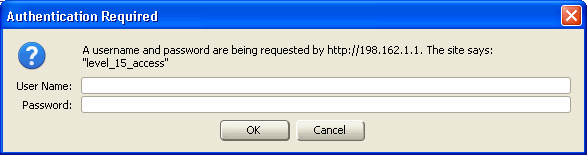
Firefox – Level_15_Access
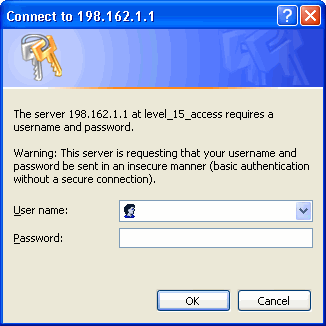
Internet Explorer – level_15_access The above problem is not related to your router, but is a result of entering in the IP address incorrectly. You will notice that in the above screenshots, the IP address is 198.162.1.1. This is not the address of your router. This is the address of another server somewhere on the Internet, which explains why your ID and password don’t work.
The address that you should enter in your web browser is 192.168.1.1. Once you enter in your ID and password, you should have access to the administrative pages of your router.
-

How to Create a PDF for Free
When I visit web sites I notice many of them are offering e-books. These are usually books in a PDF format that can be downloaded and viewed with a reader. The most popular reader is Adobe’s Acrobat Reader. The once nice thing about PDF documents, and probably the reason they were chosen for e-books, is that the document will look the same regardless of the reader’s computer. Other formats, such as Microsoft Word, may look different depending on whether the reader has the same fonts installed.
Many tools that are used to create a PDF document cost money, but I use a tools that is free. So if you are interested in creating your own e-book, or would just like to create a PDF document, then I’ll talk about the tool you can use for free with pretty much any application.
-

WordPress Error: Allowed Memory Size
I recently upgraded to the current version of WordPress. I am always weary about upgrading as there are many things that can go wrong. I realize that upgrading WordPress is required for bug and security fixes, but I also realize that all plugins that I use may not be compatible with the latest version.
That being said, I decided to upgrade when I had time to solve an problems. I waited for some time to see if others have had issues, and when I was satisfied, I performed the upgrade. Once the upgrade had completed, however, I ran into a problem when I accessed my plugins from the admin panel. The problem was related to memory, and it prevent me from viewing the plugins I had installed on my blog. The good news is that the fix was simple, but did take some quick searching to find.