Search results for: “label/Networking”

  • The Best Music Apps for Any Type of Smartphone

    The Best Music Apps for Any Type of Smartphone

    Music is one of the things that interest a lot of people. We hear it every day and we love listening to it for so many reasons. Many of us are even die-hard fans or supporters of music artists like Adele, Coldplay, Maroon 5, Josh Groban, and many others. With the continuous advancements in technology, music has become more available and more accessible to almost anyone. This is particularly true for people with electronic mobile devices such as smartphones. Downloading of mp3 files is now easier. If you think this is all technology can deliver, think again.

    There are now music apps that can be installed for much faster access to music. Some of these apps are Pandora, Slacker, Shazam, MOG, Thumbplay and Grooveshark. With these apps, you can always enjoy your favorite artist and discover new music that may interest you. So, read on below to know more about the features of some of the mentioned apps.

    (more…)

  • Disinfecting Your Computer of System Doctor 2014

    Disinfecting Your Computer of System Doctor 2014

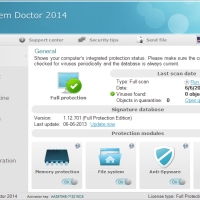
    System Doctor 2014 may be the most frightening and nerve wrecking malware today. This rogue antivirus software is the perfect combination of deceptive and destructive, using multiple methods to inconvenience you and persuade you into purchase their merchandise. Instead of reinstating your computer’s health, it jeopardizes it more in order to trick you into bigger and more costly purchases.

    Pop-ups will continuously appear until you are forced to download more software from System Doctor 2014. This can be your worst mistake yet. Instesad of fixing the problem, you will just give the enemy better entry into your system.

    (more…)

  • Advantages of a VPN Server: How to Set It Up

    Advantages of a VPN Server: How to Set It Up

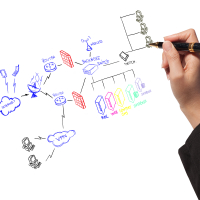
    Virtual Private Network, or a VPN server, is an Internet-based private network that is set up between several computers. With recent news that the NSA monitors a great deal of Internet-based communication, setting up a private network to give an extra layer of privacy between yourself and government agencies overstepping their bounds can’t hurt. A VPN might sound complicated to set up at first, but the advantages are well worth the effort you put into the server search and configuration.

    (more…)

  • 6 Tips to Increase Your Productivity Using Siri

    6 Tips to Increase Your Productivity Using Siri

    One of the features that Apple fans love about the new iPhone 4S is Siri. Siri is the voice-activated personal assistant that comes with the new iPhone 4S. Siri uses the technology of artificial intelligence to take voice commands and then simulates the commands to find the best possible way to execute it. With Siri, you will be able to set calendar appointment, send email or text message, search the Internet, use location-based services and more all with just a simple voice command.

    Siri does extend the functionality of your phone and it helps to make iPhone users’ life very convenient. But to be able to maximize the full feature and increase your productivity using Siri has to offer, here are some tips.

    (more…)

  • 4 Ways to Use Tech to Find a Better Job

    4 Ways to Use Tech to Find a Better Job

    Although employment rates are steadily improving, the job market is still tough, leaving prospective employees looking for every possible outlet and leg up they can find. To this end, technology helps tremendously by making it possible to search for open positions in ways that weren’t previously available. Before you think about relying on the classifieds or on word of mouth, you should see how many more prospects you have if you, too, use technology in your job search.

    (more…)

  • Key Ingredients to Successful Online Selling

    Key Ingredients to Successful Online Selling

    Technological advancements have given our society many benefits and advantages. Numerous opportunities have opened up for consumers and business providers. Consumers now have a variety of products and services within easy reach and businesses are now able to connect with customers easily and quickly through various online means – website, social networks, etc.

    With online selling, businesses are no longer restricted locality limitations. Online sales have been on a steady rise for the past couple of years; and this is a worldwide trend. More and more people are now opting out of real brick-and-mortar store visits by choosing to do their shopping from the comfort of their own home.

    By the end of 2013, the UK reported an all-time record of over £10 billion, based on IMRG Capgemini e-Retail Sales Index, according to “The Guardian”. North America and Asia-Pacific are also experiencing this upward trend.

    With these thoughts in mind, starting an online business is a very wise move. In considering how to sell online, note the following key ingredients to successful online selling.

    (more…)

  • About Me

    My name is Paul Salmon and I have 20 years experience using computers. I have a strong programming background, which has helped me solve many computer problems, as well as understand many new applications.

    About this Blog

    I had thought about starting a blog for some time, but I had difficulty deciding on the niche to write about. One day I was fixing a computer and decided to start a technical blog where I would share my knowledge with others.

    On June 23, 2007 I took the plunge into blogging by creating Technically Easy on Blogger. While it was slow in the beginning, as time went on and the posts were published, the traffic on Technically Easy began to pick up.

    Why Technically Easy?

    I created this site to help others solve technical problems through easy to understand posts. Many posts contain step-by-step instructions to solve a problem, while also including screenshots or code samples.

    Throughout the life of Technically Easy I have discussed topics such as networking, digital cameras, archiving, Blogger, and Windows. Every time I solve a technical problem in my life, I write a post about it so others can find the answer quickly.

    I hope you enjoy Technically Easy.

    Subscribe to Technically Easy

    If you would like to subscribe to Technically Easy you can use the subscription link.

    Contact Me

    You can contact me at admin AT technicallyeasy.net if you would like:

    • Help with a computer problem.
    • Would like me to publish a post with regards to a technical question. Please make sure that I have not already covered the topic with existing posts.
    • A problem or question about one of my current posts.
    • Constructive criticism about Technically Easy.

    I will not respond to spam or harmful e-mails. Those will be deleted without reservation.

  • How to Stay Safe With Social Networks

    How to Stay Safe With Social Networks

    If you own a business – online or offline – or just enjoy creating a website or blog, then chances are you will inevitably be involved in one or more social networks. Social networks have taken off tremendously in the past 8 years or so, and it seems most people seem to have used social network in one form or another. Today, networks such as Facebook and Twitter, have become an important part of reporting events and daily lives more than any form of news.

    Of course, as with many things in life, social networks are not immune to risks. Unfortunately, many people have had malicious things happen to them, their friends, or their family because of social networks. While social networks can be tremendous resources, it is important to understand what you can do to stay safe while using online social networks.

    Securing Your Social Network

    If you bank or perform financial transactions online, then you know how important security can be. When it comes to social networks, you should approach those sites in a similar manner. Whether it is a bank or social network, both types of sites contain your personal information that you don’t want known to strangers.

    Here is a few tips to help keep you safe when using social networks:

    Create a strong login. While you may not be able to choose your user name, as some networks automatically may use your e-mail address, you can choose a strong password. Create a password that is long and strong. Ensure your password is at least 10 characters in length and contains letters (both upper and lower case), numbers, and punctuation and symbols. When it comes to passwords, the longer a password, the strong it is. You also don’t want to use the same password with other sites, so ensure that it is unique. If you have trouble remembering many passwords, you should look at using a password manager such as LastPass.

    Encrypt you connection. Most, if not all social networks, now provide an option to secure your connection using SSL. This encrypts any data that is exchanged between your computer and the social network. If the option is enabled by default, and it is available from the social network, you should enable it. Web browsers will display “https://” beside the URL of the social network, and also display a lock icon somewhere on the browser windows to indicate the connection is encyrpted.

    Be aware of phishing e-mails. Many times you may receive an e-mail reportedly from a social network, however, many times it could be criminals trying to get you to divulge your social network user ID and password. Such e-mails will usually contain a link to a malicious site that is disguised to look like the real social network site. If you receive such e-mails that you are unsure about, then you should manually open your browser window and log into the social network directly. From there you should then check for messages from the site.

    Be wary of link scams. While e-mails are a major way for criminals to obtain information, they may also post malicious links on social networking sites. Such links will usually take you to a site that infects your computer with malware. You may even receive suspicious links from a friend after their account has been compromised. If you are unsure, or suspicious of a link from a friend, you should call them up and ask them about the link.

    Be aware of what apps you have installed. When you add or install an app through a social network, be aware that the quality control process may not be enough to prevent malicious apps from appearing on social networks. Many apps require specific access to your account, so you should understand what permissions you are providing to each app, and what happens after the app is installed. Ensure you only install apps that are well-known and trusted, and only if you need to install the app.

    While we all like to use social networks for different reasons, it is important to take the necessary steps to keep yourself, your friends, and your family protected. Social networks can be a very useful tool for a variety of reasons, but you must also be aware of the malicious activity that can occur if you are not careful.