Search results for: “label/Web%20Site%20-%20Design”

  • How to Secure the Linksys EA2700 (N600) Wireless Router

    How to Secure the Linksys EA2700 (N600) Wireless Router

    When you buy a wireless router – any wireless router – you must make sure you properly secure the router and your wireless network. If you don’t secure both the wireless router and the network, you allow unauthorized users into either your router, your network, and possible any device attached to your wireless network.

    While securing the Linksys EA2700 (N600) wireless router may sound complex, there are only a few setting changes that you need to change to secure both your router and network. Below are the steps that you need to take to secure your wireless network.

    Logging into the Router

    1. Open a Web browser and type “http://192.168.1.1” (without quotes) in the address bar. Press ENTER.
    2. When a login windows appears, enter “admin” (without quotes) in both the username and password boxes.
    3. If a warning windows appears, check the “Do not show me this again” checkbox and click the “OK” button.

    Note:

    If the IP address of the router has changed, or 192.168.1.1 doesn’t work you can look up the IP address of your router by using the steps outlined in How to Get the IP Address or Your Router.

    Note:

    If the username and password have been changed before, and you can’t remember the login credentials, you can reset the router back to factory defaults and then continue with securing the router. To reset the router you can follow the steps outlined here: How to Reset the Linksys EA2700 (N600) Wireless Router.

    Securing the Administrator User

    Before securing your wireless network, you will first need to secure the administrator account to your router’s setup. That is the account you logged into in the previous section.

    All router default username’s and passwords can easily be found online, so it is important to change the login credentials to protect your router and wireless network.

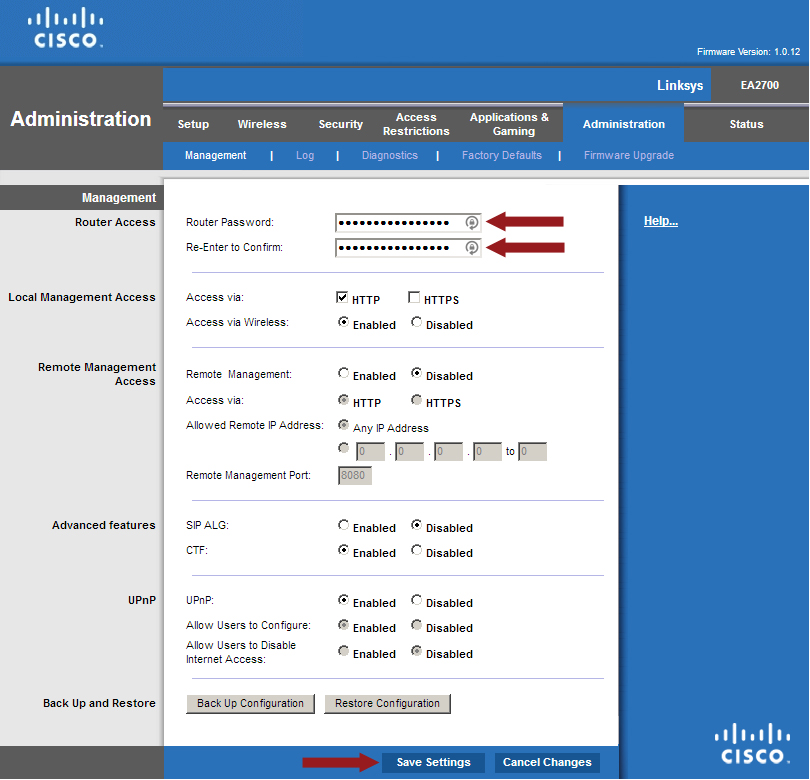
    1. Log into your router, and then click the “Administration” option from the top menu.
    2. In the “Router Access” section, enter a long and strong password in the “Router Password” box.
    3. Enter the same password in the “Re-enter to Confirm” box.
    4. At the bottom, click the “Save Settings” button.
    5. Linksys EA2700 - Administration Management
      Changing the Linksys EA2700 (N600) router’s administrator password.
    6. When prompted, enter “admin” as the username, and then your new password to re-access the setup to your router.
    Securing Your Wireless Network

    Now that your router’s setup is secured with a new administrative password, you can go ahead and secure the network.

    1. If you haven’t done so, log into your wireless router.
    2. Click the “Wireless” menu option at the top.
    3. Click the “Disable” option beside “WPS” and then click the “Manual” option just above it.
    4. Note:

      While Wi-Fi Protected Setup (WPS) may sound like an easy way to secure your router, it is a major security vulnerability (please read Why Your Wireless Network May Not Be As Secure As You Think. While there are more steps to manually securing your router, and then connecting devices to your wireless network, you will have a more secure network.
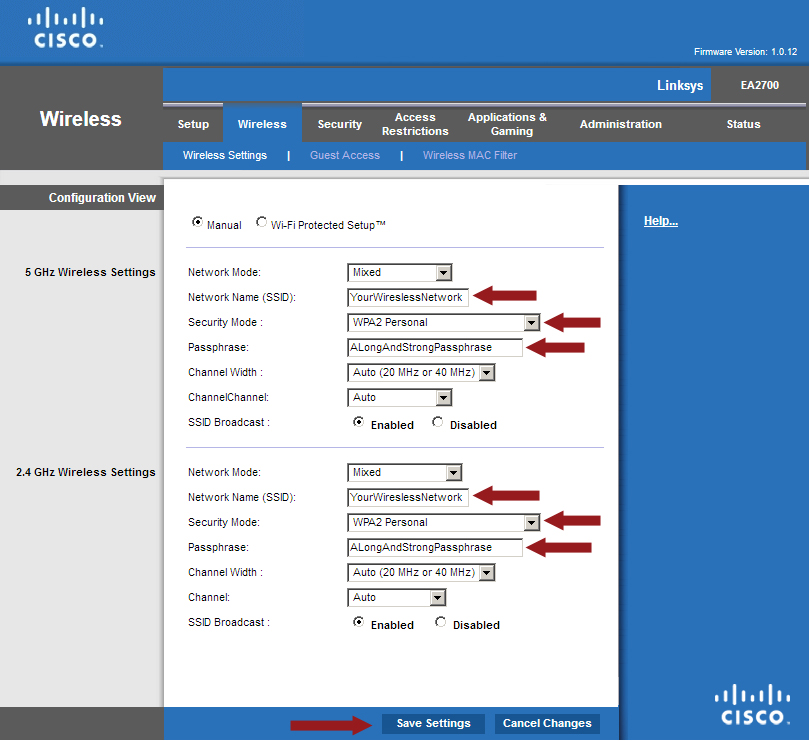
    5. The Linksys EA2700 has two frequencies – 5 GHz and 2.4 GHz. You can set up a single wireless network on each, but it would be best to have both frequencies used by one wireless network. Beside “Network Name (SSID), give your wireless network a name. Ensure you enter the same name in both the 5 GHz and 2.4 GHz sections.
    6. For “Security Mode”, select the “WPA2 Personal” option. Do the same for both frequency sections.
    7. Beside both “Passphrase” options, enter a long and strong passphrase. This is what you will enter when you connect a device to your wireless network.
    8. Click the “Save Settings” button.
    9. Linksys EA2700 - Wireless Settings
      Wireless settings to secure the Linksys EA2700 (N600) wireless router.

    At this point your wireless network is secured. To connect a device to your network, you simply select your network from the list and then enter the passphrase you created.

    If you forget your passphrase, you can simply connect a computer into the router with an ethernet cable and then re-enter the setup by entering “192.168.1.1” into a Web browser.

    Additional Security Settings

    While the preceding sections are enough to have a secured wireless network, there are a few other settings you may want to look at to fully secure both your network and your router.

    1. Log into the setup of your wireless router using a Web browser.
    2. Click the “Administration” menu option at the top – the “Management” section should be displayed.
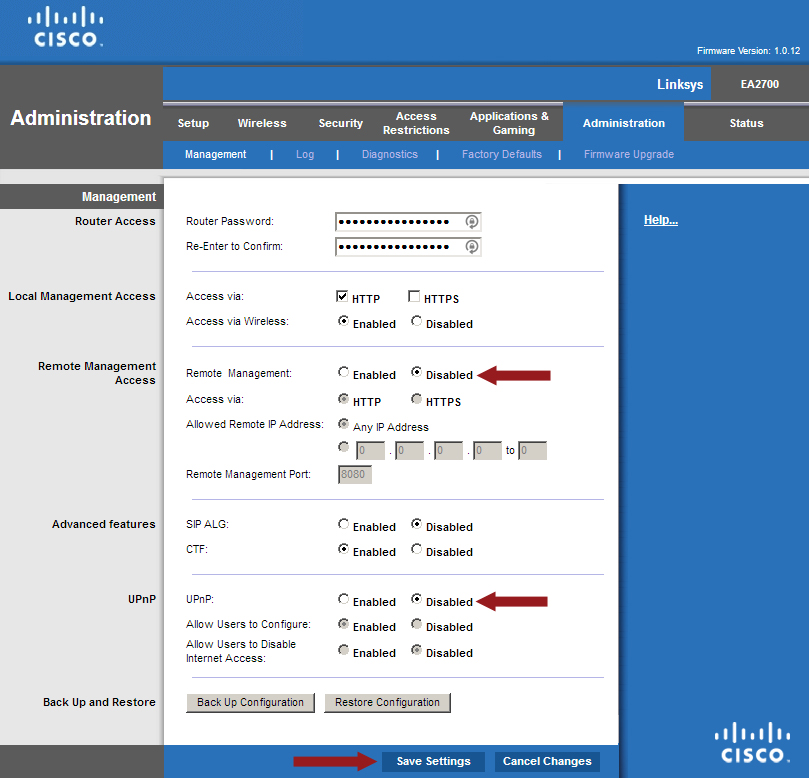
    3. In the “Remote Management Access” section, make sure the “Remote Management” option is “Disabled”.
    4. In the “UPnP” section, click the “Disabled” option next to the “UPnP” option
    5. Click the “Save Settings” button.
    6. Linksys EA2700 - Administration Management - Additional Security Settings
      Changing additional security settings on the Linksys EA2700 (N600) wireless router.

    At this point your wireless router is secured and you can feel confident that only authorized devices can connect to your network.


  • No Website is Crash Proof: What is Your Crash Plan?

    No Website is Crash Proof: What is Your Crash Plan?

    Although most web hosting companies will promise VPS hosting or dedicated hosting services with 98% uptime, failing to plan for that 2% of downtime is planning to fail. Having a crash plan is therefore extremely important for the overall success of your website.

    No webhosting company promises 100% uptime, and for good reason: It isn’t possible to fully prevent outages. However, safeguarding your site against downtime requires certain precautions, including the right technology and software, the right hosting partner, and the right managed services.

    (more…)

  • The Most Effective Ways to Increase the Security of Your Home Network

    The Most Effective Ways to Increase the Security of Your Home Network

    If you are like me, then you are always looking for ways to increase the security of your home network. Threats to your network, devices and to your files can come from anywhere online. So it is important to take the necessary steps to ensure your home network is secured.

    This post will outline some of the settings that I use to protect my network, devices, and files from both malicious software and users.

    Router Security Tips

    Router Security Tips

    The first line of defense of my network starts at the access point from the Internet into my network – the router. The router I am using is a Linksys E4200. It is an older router and only supports Wireless-N.

    I have flashed DD-WRT onto the router, so I have many more options than with the stock firmware. The DD-WRT firmware allows me to apply more security onto the router and adjust many more settings than the stock firmware allows.

    Here are the settings I have configured in my router:

    Administrator ID and password changed
    I have changed both the administrator and password for the router.
    Enabled WPA2 with passphrase
    Probably the most important security of wireless. I have configured my wireless network to use WPA2 with a strong passphrase. I always have to look it up when I want to connect a device.
    Using OpenDNS
    To help manage what sites my network can access, I use OpenDNS as my DNS servers in my router. This allows me to block certain domains that are not appropriate for my kids, which also includes malicious sites.
    Configured a guest network
    I have setup a guest network for guests to use. The guest network uses WPA2 with a much easier passphrase to remember so I can easily remember it. It is also prevented with firewall rules from communicating with the main network. This network also uses OpenDNS and the firewall rules enforce he use of OpenDNS.
    Disable WPS
    WPS is a security issue and I don’t use it, so I disable it.
    Disabled remote access
    I can’t access my router from the Internet. I can only access my router from a computer hard-wired into the router.

    Computer Security Tips

    Computer Security Tips

    Even though I have secured my router, I also need to make sure each computer that is connected to my network is also secured.

    For guest computers, I can’t verify what is installed or not installed. This is the reason I have those computers connect to the guest network.

    Here is a rundown of what security settings and software I have configured on my home computers.

    Never run as an administrator
    For seven years I haven’t found real need to run as an administrator. In fact, I can give you many reasons not to run as an administrator. I don’t run as an administrator on any of my computers.
    Google’s Chrome as my Web browser
    I use Chrome for its sandboxing and extensions features. One of the benefits of Chrome is tat each tab is a separate process so one tab doesn’t crash another tab. Firefox is my secondary choice for a Web browser.
    Use uBlock Origin in Web browsers
    When it comes to websites, I don’t trust many sites online, especially the JavaScript. uBlock Origin is always running in Chrome so I can choose what sites run JavaScript.
    I don’t use Flash
    Flash is disabled in my main browser. I find I don’t need to use Flash as much but if I do, I have another browser with Flash enabled that I will use to display Flash content when needed.
    Use a software firewall
    A hardware firewall can block access into my network, a software firewall can block application from connecting to the Internet. If I do get infected with malware, I don’t want it to connect outside my network, so my software firewall blocks the attempt. The built-in Windows firewall works for me.
    Anti-malware software installed
    I have Malwarebytes Anti-Malware Premium installed on my main desktop, with scheduled scans each week. On other computers I have the free version and run scans periodically.
    Anti-virus software installed
    I am not a big believe in anti-virus applications these days as they are basically reactive software. To avoid too many applications from being loaded, I just stay with the anti-virus built into Windows. Anti-virus scans are scheduled on a weekly basis.
    Windows and installed software is kept updated
    I always try to install the latest updates for both the operating system and installed software. Microsoft releases patches on the second Tuesday of every month. Adobe follows the same schedule, but other applications will provide a notification.
    Always keep in mind that all software has security flaws
    When it comes to software, I try to remain vigilant. I believe that all operating systems and applications have security flaws.

    Data File Security Tips

    Data File Security Tips

    I also look at security down to my data file-level. This means how can I best protect my files, both from an operating system and restorative perspective.

    Here are some tips that I currently have implemented, and you may do the same as well.

    Multiple backups
    I always keep multiple backups. Two copies of my files are stored locally, and two copies are stored offsite.
    Automated backups
    I have automated my file backup process. When a file is placed in a folder, it is automatically mirrored onto a second, local hard drive and also uploaded to my online backup cloud.
    I don’t have write-access to my data files outside my server
    I go to great lengths to protect my data files. Any new files or changes are written to a staging folder, and a service on the server copies the changes to the master folder. The folders that contain the master copies of my data are always mapped with a read-only account.

    That is my list of security settings and tips that I have applied within my home. Security involves multiple layers to properly protect your home network and all devices that connect to that network. While you may not implement as many features, it is important to recognize that you must apply some security on your network to protect our computer and data files.

  • How to Generate More Traffic to Your Website

    How to Generate More Traffic to Your Website

    When you are building your first ever website for your business, there are loads of different elements that you need to quickly get up to speed with.

    From knowing how to find the best web hosting service to developing an effective marketing strategy to attract new customers, you will have your work cut off for you.

    Choosing your web host comes down to much more than price and it can have a big impact on gaining new customers.

    For example, if you have an unprofessional looking website because there are loads of ads flashing up, or if your website takes ages to load up, this will put people off. The whole point of having a website is to enable people to find your services but then also to impress them and convince them that you are the right company to go with.

    So make sure that you choose a web host that will support these requirements.

    Once you have your website set up you can start on the next part, which is driving traffic to your website. There are a number of different ways that you can do this, so let’s look at some of the most effective methods:

    Paid traffic

    A lot of people are turning to services like PPC, where their website is advertised somewhere online and they pay a fee each time someone clicks through to their site from it.

    If you are reluctant to spend money then you might want to look at some of the other options but remember that saying ‘You have to speculate to accumulate’?, well sometimes you have to pay a bit to get a lot of traffic.

    You can work out for yourself whether it is going to be a cost effective solution for your business. Say you pay £1 per click but half of your generated traffic makes large purchases, then you would be making a lot more money than if you didn’t pay for traffic.

    Provide free stuff

    Everyone likes a free offer, especially if it is something that they really need. So whether you create a blog on how to rewire a plug or you offer an online guide to fitting hair extensions, creating useful, free content will draw people to your website.

    When you are writing your blog or article, remember that this is your opportunity to demonstrate your expertise. But having said that, people don’t want a hard sell so you have to get the tone and content right.

    Get all of your useful content together and then just include a fairly subtle link to your services/website etc. at the end.

    SEO

    Don’t fancy paying fees for PPC? You can always become a SEO master and get your website to appear high up in the search engines.

    Finding out which keywords to use and other techniques such as linking to authoritative sites can help you to appear higher up when people are searching. You can get a lot of traffic through organic means when you understand SEO and how to optimise your website.

    There are a lot of factors that determine where your site appears in the search engines and the likes of Google update their algorithm on a regular basis.

    This means that you should try and keep up to date with the most current successful SEO practices through SEO expert updates.

    Of course, there are lots of other ways to get traffic to your website, such as direct mail, email campaigns, YouTube videos and much more but you’ll be onto a good start with these ones listed above.

  • Factors to Evaluate the Incredible Importance of Social Media in SEO

    Factors to Evaluate the Incredible Importance of Social Media in SEO

    Do you know that making a stylish and classy site that looks competent is not enough to make your site successful?

    The one thing that can help your site to stand better is how SEO Friendly it is actually. If the site has everything, but it is unable to cross-check that, in that case, your site will not be worth anything.

    The combination of Social Networking and Website positioning has always been challenging. However, it eventually works towards your best interests.

    A couple of months back, Matt Cutts said, “Social Signals aren’t treated just for Google’s Ranking Algorithm.”

    This means just because you have lots of following on social networking; it does not mean it will increase your Google Ranking. Discouraging it may be, but still, the following is the only way Social Media can certainly help you grow online.

    Link building

    SEO is all about backlink building for your content material while Social Networking is about engagement and building relations. The fact is that we pay no attention to how Social Media can certainly help us build a great number of natural links.

    Once your content is distributed, it shows the part of someone`s curiosity, something you want to capture and carry with the domino effect.

    If your content material creates hype, link it to your site, it’ll increase your ranking with search engines like google because it will advertise your brand.

    Helps you Getting Influencers

    It does not matter whatever your area of interest is; you’ll always have a variety of influencers whose following is engaged in such market. You can easily use a couple of online resources to find them.

    Just type something about gizmos, for example, “Mobile Accessories” or type it on google trend checker. Make use of its filtration system and see only the favorite content based sites on its number of shares.

    To get the influencers, you have to check the top tendencies on different social networking platforms. You may also sign up a few weblogs and keep yourself updated on the hottest developments or seek the services of an agency to do this for you like Kamil social media company in Dubai.

    Building strong interactions

    We hate to break it to you that your every single piece of content material will not go viral. Having said that, you can improve its likelihood of success by sharing on social websites.

    The Influencers have bulk fans, and people follow these influencers for sane causes. Their admirers trust their every write-up. This will improve your presence and formulate a ripple effect.

    This Ripple Effect is understood to be Impacting on your customer with something and encourage him to sell it for your benefit.

    The major search engines now comprehend the value of Social Media Marketing for a prospective customer.

    If you add social media buttons on your website design, it will increase your ranking in search engines. When it comes to developing your site, you have to add some social media icons for your accounts including Facebook, Google+, YouTube, Twitter, and some others.

    Use search engine optimization for images

    The issue is, many people just optimize for the textual content on their site, plus they won’t take good care of images. If images are continuously optimized, they dramatically improve the position of your site in search engines.

    When it comes to select a good image for your site, you have to make sure it’s not too big. The images on your site should preferably be 30-100 kb having a resolution of 720dpi.

    If your images on the particular web page are too big, they’ll increase the risk for a web page to load slowly. Also, it leaves bad effects on your positioning.

    In alt text of your image, make use of a keyword if you are going to make your site SEO Friendly. On top of that, you have to place your images very carefully on your site, the more appropriate they seem to the web page, the more they’ll increase the rank of your site.

    You can easily get in contact with these important figures and focus on building your relationship with them. It is a time taking process.

    However, it will be worth your effort and hard work. Being the only one after such connection, you will have to be noticeable and instead of only praising the work you do, learn and then use it to save your time.

  • OneLogin

    OneLogin

    There’s a serious problem that’s growing with the shifting trends of business today, and it’s an elephant in every room that every bottom-rung entrepreneur and CEO alike wants to ignore.

    The problem is that businesses are becoming increasingly reliant upon third-party services to carry out their work and secure quality assurance metrics.

    These metrics must be met for a host of revenue- and legal-driven reasons that can lead to insurance cuts, lost business and other serious problems down the road, so of course it’s important for every manufacturer to enlist vendors for every task that the manufacturer itself isn’t equipped to handle on its own.

    This is why people hear about the network of seemingly invisible companies that are woven into a single operation.

    In fact, the increasing complexity and pace of society today has burgeoned to such a degree that nearly half of the manufacturers out there have left their databases severely exposed to the laptops, tablets or smartphones that their third-party representatives are using to capture and report information with.

    The ubiquity of smartphones has made it ever more possible for black-hat code manipulators to shoehorn themselves through the many uneven edges in the out-facing facade of a manufacturer’s metaphorical cyber-garrison.

    Sobering dtatistics

    There are several ways that an unwanted presence can find its way into a manufacturer’s database. Consider the fact that most field vendors create the following environment for the back-end IT managers to contend with:

    • Different operating systems.
    • Different versions of the same operating systems.
    • Different applications installed on each of those operating systems that potentially have their own backdoors, permissions and loopholes.
    • Different browsers to interact with the web.
    • Different connection types, protocols and providers.
    • Different hardware with potentially unique exploits in each combination.

    This conglomeration creates a nearly infinite number of variables that a hacker can leverage to gain entry to personal information; it’s just a matter of finding the most convenient one and kicking down whichever doors aren’t secured properly with multi-factor authentication.

    Some exploits are discovered early by the wrong people and are never revealed until an opportune moment arises. This leads the discussion to some scary numbers:

    1. Ten percent of the manufacturers on the market are exchanging data with 200 or more vendors.
    2. Another 33 percent use between 25 and 200 vendors.
    3. Of all the manufacturers that are impacted by security breaches, 90 percent are left with at least $190,000 in damages.
    4. The other 10 percent of that figure experience losses at a minimum of $750,000 per breach.

    The problem this creates

    No, this isn’t an attempt at calling out how people handle their businesses; in fact, that has very little to do with this.

    The reality is, a new age of computing technology, networking and security concerns means new MFA measures must be adapted to circumvent the ever-growing threat of privacy breaches that could expose not only client data but also result in massive damages to company operations on top.

    Many of these attacks occur from individuals who operate on the dark web to exchange the fruits of identity theft for sums of bitcoin to those who can impersonate clients, and the last charge that any entrepreneur wants to be saddled with in a courtroom is facilitating the ruination of people who trusted their services.

    How to handle it

    Companies are handling this in a number of roundabout ways with, well, more third-party companies: deep web scanners, security checkpoints, misplaced multi-factor authentication protocols, over-tightened restrictions and a number of other underwhelming measures that don’t actually prevent malicious code from making it in the front gate and to the hard drives themselves.

    No, this is where the manufacturer needs to trust in OneLogin, a service that provides a complete barrier to set the business servers apart from the vendors who report their work and log into the system.

    OneLogin works by channeling all incoming connections through their own services before allowing them to pass to the manufacturer’s servers, acting as a mediator.

    This funnels every connection from every app, operating system and hardware configuration into a single connection that’s secured by MFA protects vendors, businesses and clients alike.

    As the world moves forward, services provided by companies like OneLogin are becoming more important, especially for larger businesses.

  • How Does A Free Mobile Phone Tracking Application Work For Children?

    How Does A Free Mobile Phone Tracking Application Work For Children?

    These days we all want to track how our children use their phones. What they open and who do they contact to. Without mobile phone tracking apps, it is not possible to check all their activities on mobile.

    There are many famous apps for tracking the mobile activities that you can use to spy on your children. Snoopza is one of those. This is easy to use software that lets you monitor cell phone activity free. With this app, you can record phone calls, messages, chats and all other data that you want to monitor for the security of your children. This is a free to use app, you can download and try snoopza here.

    How does a mobile tracking app work

    All spying apps have some different technology but all work for the same purpose. Find below how such apps work:

    Download and install the app

    First of all, you need to download the app that you are going to use. For that, you can go to the website of any spying app and can download from there as most of the apps are easily available on their official websites. Just sign up and download the app. Next, you need to install that app on the device that you want to track.

    Make sure that the mobile that you are going to track has an operating version that is compatible with the app; otherwise, the app will not work properly. To use these types of apps on iPhone, you need to jailbreak the phone as these apps cannot be installed on the iPhones without this.

    On the android phones, there is no such problem. So, when you downloaded the app, install it on the target mobile.

    Web-based control panel let you know the sctivities

    All cell phone monitoring apps provide a web-based control panel that lets you check all the activities of the targeted mobile from anywhere. You can check the call logs, text messages, mobile location, videos, photos, contacts, and many more things.

    Also from this control panel, you can delete any software from the target phone, lock and unlock the phone and also start recordings without letting the phone user know.

    Internet access is required

    To use spying apps, an internet connection is must. The reason is without any 3G, 4G or Wi-Fi network, apps cannot send the information to the web-based control panel.

    You will not be able to track anything if the targeted mobile doesn’t have access to the internet. So make sure the mobile you are tracking have internet access.

    Require some jail breaking and tooting

    As we mentioned above, the spying app needs to root or jailbreak mobiles sometimes to work properly. Some apps can be easily used without doing all these things but some require jail breaking in case of iPhones and rooting in case of Android Phones.

    Doing this will let you use some advanced features of the app.

    Target phones must be compatible with the app

    Before downloading any spying app, make sure that the targeted phone is compatible with the spying app, otherwise, it will not work or you can miss some important information. Some apps only work with iOS phones and some only work with the Android phones.

    You need to download the app that suits the targeted mobile.

    Conclusion

    So, this is bit of information how a mobile phones tracking app works or what are the things that a spying app required to work properly. Remember that all the spying apps have some different features but main objective of all apps is same.

    So, try the one of your choice and track the mobile of your children if you have any doubt on their internet usage.

  • Everything you need to know about VPNs

    Everything you need to know about VPNs

    Privacy has been among the major concerns for most internet users in the last couple of years. We have had so many data breach scandals in recent years, which have left many internet users worried about how their data is handled by the various apps and websites they access on the internet.

    Among the best solutions for safely using the internet is installing a VPN app on all your devices. But what is a VPN and how exactly does it ensure your privacy while using the internet? Let’s find out.

    What is a VPN?

    A Virtual Private Network (VPN) is a service that protects your internet connection by encrypting your browsing information hence hiding it from all third parties, including your ISP and government. Even the websites and online services you use won’t see some of your personal information, including your location, the browser you are using, and the IP address of the device you are using.

    However, you need to choose a reliable VPN app if you are to enjoy all the benefits that come with using a VPN service.

    How does a VPN work?

    While browsing the web or using a mobile app, you are constantly sending data from your device and getting feedback (data) from the website or web application you are interacting with. Without a VPN, this raw data can be intercepted and accessed in between the journey by your ISP and several other third parties. If you are using a public WiFi network, people using the same network can easily know your device’s IP address or even access your device.

    When you use a VPN, all your browsing data is encrypted before it leaves your device. This data is then sent over to the VPN’s server. The request to the website or web app you are interacting with will now come from the VPN server and not your device. That is why the websites and apps you use will never know your real location if you always use a VPN.

    Since all your browsing data is encrypted, they also won’t get any of your other browsing details such as your IP address, the browser you are using to access the internet, the operating system of your device, etc. This makes it almost impossible to profile you unless you agree to give them your personal information voluntarily.

    To ensure fast and reliable connection speeds, VPN services build several servers in different locations. Users are then distributed among these servers to ensure no single server slows down due to congestion. For example, a VPN service like Surfshark has over 3200 servers in 65 countries. So, always make sure to check the number of servers a VPN has and where they are located before choosing the VPN app to install.

    Users also have the option of choosing a server which they would want their data to be sent through. For the fastest connection speeds, it is best to choose a server in a region closer to you. However, if your main reason for using a VPN is to access location-locked content and apps, choose a server in one of the unrestricted countries.