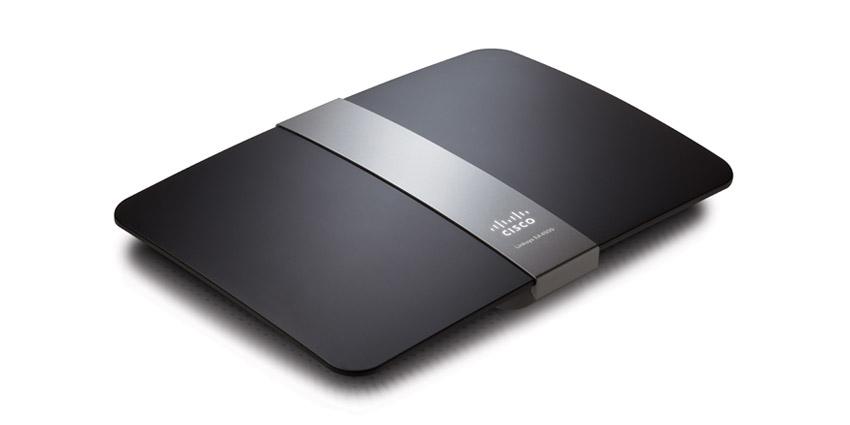
Linksys E4200 Wireless Router Review

After about 6 years, my Linksys WRT54G finally packed it in, so I went out and bought myself a Linksys E4200 dual band wireless-N router. I have several laptop computers and a media player that have wireless-N adapters, so the new router will be a welcome change.

Besides the added benefit of being able to connect using the 802.11n standard, the Linksys E4200 wireless router has a few additional features that were available on my previous wireless router. After I got the router up and running, I began to explore some of the additional features to see how well they worked. Considering this is one of Cisco’s top performance home wireless routers, I expected big things from it.


Linksys E4200 Wireless Router Review

Setting Up the Linksys E4200 Wireless Router

The package contents were basically the standard items: the Linksys E4200 wireless router, a power cable, a network cable, and a CD containing the Cisco Connect software. I haven’t used any software that came with any of my routers in the past, so I really couldn’t see myself using this one. Although I may explore the software in the near future, for reasons you will read later.

The router itself is smaller than my previous WRT54G router. While the width and length is about the same, the Linksys E4200 is slimmer, and there are no antennae sticking out from the top. This means that when I reach behind my desktop, I don’t have to worry about knocking into them.

The setup of the router was pretty straight forward, and I set it up manually as I usually do. I basically logged into the router’s dashboard through my Web browser and configured the security settings for the wireless network.

The dashboard, while it has change slightly from the WRT54G, basically looks the same, which made it easy for me to find my way around. The biggest change that I say while I configured my wireless network was the fact that you can create two separate wireless networks – one for 5 GHz, and a second for 2.4 GHz. Since this router is dual-band, devices can connect to the router on either frequency at the same time.

Since I only wanted to manage one network, I changed the settings for both the 5 GHz and 2.4 GHz bands to be identical. Doing this didn’t cause a problem, and I was able to connect both wireless-N and wireless-G devices to the different frequencies without any problems.

The one thing that bothers me about the Linksys routers is the inability to change the dashboard user ID. You can change the password easily, but the actual user ID you use to log into the dashboard can’t be changed from being blank. I have seen other routers that provide this ability, and I hope that Cisco will change this for future routers.

Router Performance

So far, I have been pleased with the speed of the router. I have a hard-wired desktop connected directly into the Linksys E4200 router, and it seems faster when downloading from the Internet. Although I haven’t done an actual speed test, the computer seems more responsive overall.

A wireless-N laptop connects to the router at faster than the 54 Mps rating of a wireless-G connection. Although, the one aspect that I am disappointed with is the range the router has. From the opposite side of the house, the laptop connects with 3 out of 5 bars within Windows 7. The WRT54G router connected with the same number of bars, so there really isn’t an improvement in the connection range with the Linksys E4200. I am a little disappointed in this as I thought I would have a better connection to the router, and because of this I my connection speed is 74 Mbps. This is still better, however, than what I would have received from the WRT54G at 5 bars.

Linksys E4200 External Hard Drive Connection

The Linksys E4200 wireless router includes a USB port on the back next to the ethernet ports. This allows you to connect an external hard drive to the router and then share the data on the hard drive to the computers that are connected to the router.

While this is a huge selling point for me, it was a nice feature that I was looking forward to trying. As I don’t have a NAS (network attached storage) device, having the Linksys E4200 router and my external hard drive act as one was a nice bonus.

After setting up my router, I connected an external hard drive into the router and the router immediately identified the drive. I was able to setup user IDs and shares for the hard drive so I could connect to the hard drive from other computers. When I tried to map to a share on the hard drive, my desktop couldn’t connect to the share. I also tried to connect to the share from a laptop, and it, too, couldn’t connect. I decided to wait a few days and try again.

The next time I tried, the Linksys E4200 wireless router couldn’t even detect the external hard drive, so I couldn’t even manage the shares. I unplugged the hard drive and plugged it back into the router, but the router still couldn’t find the hard drive.

I saw read about a few people online that have also had this issue, so it appears to be a common problem. With the latest firmware update, you can also connect a printer to the router using the same USB port. I haven’t tried this, and from what I have read, you need to use the Cisco Connect software to get the printer sharing to work.

Linksys E4200 – Pros

  • Dual band (2.4 and 5 Ghz) that allows you to connect to either band to avoid interference.
  • Ability to setup a separate network for each band.
  • Easy to configure – dashboard very similar to previous Linksys routers.
  • Connected to my ISP without any problems.
  • Connected wireless-G and wireless-N devices without any problems.
  • Lower profile – no antennae sticking out from the top.

Linksys E4200 – Cons

  • No ability to change the router’s user ID.
  • The range isn’t much better than my 6 year old router.
  • Couldn’t get an external hard drive to connect to the router.

With the exception of the external hard drive issue, I find the Linksys E4200 wireless router to be a good router. I was disappointed in the range of the router, but I do like the dual-band feature, and I had no issues with connecting any device to the router. If you can get the Linksys E4200 wireless router for a good price, I suggest you pick one up.


List Price: $179.99 USD
New From: $134.97 In Stock
Used from: $65.00 In Stock

PG

About Paul Salmon

Paul Salmon is the founder of Technically Easy. He is a an experienced PC user, and enjoys solving computer-related problems that he encounters on a regular basis.

Facebook | Twitter | Google+

Hardware Reviews, Networking , ,

17 Comments

  1. Posted May 19, 2013 at 2:16 am | Permalink

    what a great review from a aged post, still informs one about the cisco wireless router well. gained alot

  2. Posted June 27, 2012 at 5:59 am | Permalink

    You can setup Guest network access without installing Cisco connect software with Linksys E4200 router.
    In case of E1000, E2000, E3000 routers, you have to install Cisco connect software to use Guest network access. But with the new E series and EA series routers, you don’t need to install it.
    All the Linksys routers can be installed without installation software.

    http://theroutersetup.com/cisco-connect-software-for-linksys-routers/

    • Posted June 27, 2012 at 9:04 am | Permalink

      That is true. I prefer to setup the router without using software. I find it easier to setup the router through the admin site than install some software.

  3. DaveR
    Posted November 25, 2011 at 8:42 pm | Permalink

    Glad I was able to find this web site again. It took some looking. I did take back the bad router and got a replacement. BestBuy made it easy to return it for another unit. Since my experience is different this time I wanted to make sure I posted.

    The new unit installed just the way I was expecting with the first. I guess that means that the first one was actually defective. We have always had good luck with Linksys routers in the past. Hopefully this one will be the same. At least we are off to a better start now.

    Internet stats are exactly what I would expect them to be with our Comcast account. PC to PC networking is functional. I assume we have wireless connectivity, but I really do not use that much.

    Anyway, with the new router we are happy campers once again.

  4. DaveR
    Posted November 23, 2011 at 9:42 pm | Permalink

    I bought one of these today, updated the firmware to the latest version, and tried to get it to play. My Win7 64-bit machine sees the router and other PCs. What it can not see is the Internet. The router seemed to auto-sense all the Comcast IP addresses and such, so it seems like it should work. We did all combinations of unplug this, reboot that, restart the other, etc. The router is recognized, I can get to the Admin page in the router, but the Internet is never visible. We unplugged that, plugged in the old WRTGwhatever and it runs just fine.

    I do not know if it is bad hardware or what, but it is going back right away.

    • Posted November 25, 2011 at 8:10 am | Permalink

      Sorry to hear that you are having a problem. Hardware isn’t perfect and there may be times where it may not work, which unfortunately it seems may be the case in your situation.

  5. Jim N
    Posted October 9, 2011 at 2:35 pm | Permalink

    Does the software delete the old Linksys ??

    • Posted October 9, 2011 at 10:30 pm | Permalink

      I don’t think so as it is completely separate and installs on your desktop. I haven’t installed the software on my computer yet as I configured my router manually.

  6. Dave D
    Posted September 7, 2011 at 10:01 am | Permalink

    So what is the max speed people have been able to connect with? My old WRT54G was doing 54 Mbps. Can anyone get the 150 Mbps Linksys advertises?

  7. Posted September 7, 2011 at 2:29 am | Permalink

    I was thinking even though the company created new router that is wireless , it depends on what ISP you have. am I right?

  8. Posted September 2, 2011 at 10:29 am | Permalink

    I bet this new router has a terrific speed. Its perfect for big houses with a lot of computers without needing any wires

  9. Salman
    Posted September 2, 2011 at 2:13 am | Permalink

    Great review … about the Linksys wireless router !! I was planning to buy one for home usage, so do you recommend linksys or netgear ?
    Twitter:

    • Posted September 2, 2011 at 8:01 am | Permalink

      Hi Salman,

      I have always had a Linksys router, so I once again went with Linksys for my new router. Netgear has good routers as well, so if you are undecided, I would read a few reviews on routers you are interested in to help you come to a decision.

  10. Posted September 1, 2011 at 4:50 am | Permalink

    Wow this is very neat.

  11. Posted September 1, 2011 at 3:25 am | Permalink

    Hi there.
    Thanks a lot. You always posted very useful information. Keep it up, mate!

  12. Posted September 1, 2011 at 2:43 am | Permalink

    Nice post, thank you for sharing. You have really imparted useful knowledge on

    linksys router

    • E4200
      Posted May 15, 2012 at 12:35 am | Permalink

      I have problems with this cisco e4200 (their top of the line router)

      I had bought this router (since it is cisco and thought they’d be the boss in this arena). Later a few people working in Cisco advised me that Cisco has got bad customer service and their routers are having issues. Anyways, i had already bought before i came to know.

      Within 1 month, one fine morning, it just stopped working. After talking with the customer support -2-3 times, 1 with the customer support, then the call dropped and had to repeat this process all over again and finally to their boss which took almost 4 hours in total, they concluded that the router was bad and they would replace it. And they did, BUT WITH A REFURBISHED ONE. I did not understand why should i get a refurbished router when i had paid for a new one just 20-25 days ago…. BAD SERVICE.

      Then after 5-6 months, this happened again. I called customer service and they asked me to pay 30 dollars to take a look at it which i did not want to… I would rather buy a new one.

      After looking over the internet, i came to know that this router has some issues.

      But, for the ones who want to try, please do a firmware update…reboot the router etc.

Post a Comment

Your email is never published nor shared. Required fields are marked *

*
*

You may use these HTML tags and attributes <a href="" title="" rel=""> <abbr title=""> <acronym title=""> <b> <blockquote cite=""> <cite> <code> <del datetime=""> <em> <i> <q cite=""> <strike> <strong>

This blog uses premium CommentLuv which allows you to put your keywords with your name if you have had 5 approved comments. Use your real name and then @ your keywords (maximum of 3).

Subscribe without commenting

  • About Me

    I am Paul Salmon, an avid technology fanatic who is always learning new things. My goal is to inform and help others with technology.

    With this blog I try to cover various topics on this blog to cover a broad range of topics.

    Read more...

  • Email:

  • Advertise with IZEA Media
  • Sponsors

  • Recent Posts