One of the most common mistakes that people make when setting up online accounts is creating secure passwords that are weak and easy to crack by hackers. When hackers attempt to hack into an account, they can run through multiple searches at a time, and quickly pick up on all the little tricks that people use to “personalize” their login information.
A strong password is the most basic form of online security you could have. Your password unlocks everything from your bank account to your email account, and if it is inadequate then a total stranger could gain access to your most personal information.
If you are one of the many individuals who have been impressed with the use of social media for promoting business, then you must seriously consider using Twitter for business purposes. It is one of the most widely used social networking sites worldwide. The users of this site send messages that are called “tweets”, which are displayed on the profile of the author. These messages engage a group of people who are called “followers”. In turn, you have the option to follow the individuals that you like or admire.
Twitter makes a lot of business sense for the corporate as it has got more than 25 million active users, majority of them being in the group 16-45. People from various parts of the planet use this as a way to communicate and make new friends. One thing that is common between them is the desire for more followers. Following are the some simple tips that will help you to get more followers.
WordPress is arguably the most popular content management software (CMS) available. The fact that WordPress is free, easy-to-use and has a tremendous amount of support available makes it an ideal CMS for creating and managing a website or blog.
While WordPress is designed to be easy-to-use, it also has enough complexity that allows you to create about anything for your website. For the average user, however, you won’t need to manage this complexity as there are plugins and templates to do most of the work for you. For others, you may want to look at what WordPress has to offer.
A WordPress site can be typically divided into two segments:
The general look and feel of a WordPress website generated by logic and templates.
A MySQL database in which all content powering the website is stored.
SEO or Search Engine Optimization is both simple and complicated. There are a lot of things to do when you are optimizing your site for SEO purposes, but most of the basic things that can be applied are actually very simple to use. In this article, we are going to talk about some more simple SEO tips you can apply today. Let’s get started, shall we?
You already know that you need to protect your laptop and desktop computers from hackers. A lot of people, however, never stop to wonder whether their mobile devices are also susceptible to these threats.
Since your smartphone is essentially a small computer, there is a possibility that someone will try to hack into it to steal your private information. You can protect yourself by following these four tips.
1. Avoid public Wi-Fi
Public networks offer convenient ways to access the Internet without spending more money on your phone’s data package.
Unfortunately, public Wi-Fi also puts you at risk, since savvy thieves can use man-in-the-middle attacks to intercept your data. It’s relatively easy for these people create fake networks that offer free Internet access. When you connect to them, though, the hacker can watch everything you do.
Hackers can even use this method to steal passwords to your email, credit card, and other sensitive accounts.
If you absolutely have to connect to public Wi-Fi, use a virtual private network (VPN) to prevent other people from viewing your activity. It also helps to:
Disable file sharing.
Turn your firewall on.
Use HTTPS or SSL to encrypt data.
2. Only visit trustworthy websites
You could accidentally install malware on your smartphone just by visiting the wrong website. The problem is so significant that the Department of Homeland Security uses color-coded threat levels to identify dangerous sites.
It’s best to only visit sites that you know you can trust. You can always check your Gmail and Facebook accounts, for instance, without worrying that your phone will contract malware.
If you don’t completely trust a site, then you should stay away from it. That obviously means that you should steer clear of sites with questionable content. Visiting an adult website is a surefire way to compromise your phone’s security.
You also should resist the temptation to click links sent to you via email. That video of puppies playing is probably pretty cute, but it also puts you in harm’s way. Do not click it unless you know that the link will take you to a reputable site.
3. Protect yourself from Bluetooth hacking
Bluetooth makes it possible for your smartphone to connect to other devices. That’s extremely useful when you want to use wireless headphones or play songs through your car’s sound system. Bluetooth, however, can also give hackers a chance to access your phone.
Turning off Bluetooth when you aren’t using it is one of the most effective ways to protect yourself. Of course, you don’t want to keep that feature turned off all the time. What’s the point in having Bluetooth if you can’t use it?
Instead of limiting your use, use Bluetooth accessories from a trusted provider to minimize the chances that someone will hack into your phone. After all, you can never have too much security.
4. Install security apps
Installing security and anti-malware apps will help your smartphone recognize potential threats. This should protect you when you visit a website that tries to install eavesdropping software.
Some of the apps also have anti-theft features that will let you remotely wipe your phone’s data. Even if you can’t get your smartphone back, at least you can prevent the thief from stealing your information.
Some of the best security apps for Android devices include:
Having these apps will improve your smartphone’s security, but you should still take common-sense steps to protect yourself. Don’t assume that an app can always keep you safe, especially if you use public Wi-Fi or visit unknown sites often.
As more people make smartphones a daily part of their lives, the security threats from hackers will only get worse.
You can protect yourself by following these four tips to stay ahead of the hackers’ game. Any step you take to increase your smartphone’s security is a step in the right direction.
Modern employee communications take place online. Employees are more productive when they understand how they fit into a company and are helping to achieve those company goals.
Open communication provides feedback to management as well as faster troubleshooting when problems arise. This communication leads to employee retention and better customer service.
A company intranet system can provide this communication. Your intranet should engage people and reward them for participation.
Surveying employees can provide feedback on the type of information they want to receive and how they will interact with this information.
By including employees in the planning process, you help gain employee buy-in of the process and make staff feel like an integral part of the company.
Some uses of a company intranet may include daily bulletins, employee events, policy changes, company performance, and press mentions.
Allow people to respond online with questions and comments. Try surveying employees to gain a consensus, or provide an anonymous form for suggestions or complaints.
New contracts, expansions, and new hires are always newsworthy. New people in different positions can be introduced to the entire workforce through an employee intranet.
Special projects, programs, and discoveries help educate employees on company business. A new patent or a new piece of equipment can be the focus of a daily or weekly update.
Some additional types of news you may want to include are:
Updates across different divisions or locations.
Interdepartmental updates and goals.
HR updates and employee benefit news.
Awards and honors such as outstanding service, perfect attendance or community outreach.
Sports and recreational updates such as intramural events or the locally sponsored Little League team.
Weekly highlights or records.
Special events like charity drives, donation programs, or the Go Fund Me of an employee’s family in need.
The great thing about an intranet is that you can also customize your site based on specific group needs.
The finance department may sound dull to the person involved in engineering, even though finance processes payroll and determines yearly bonus checks.
Marketing, contracts, and manufacturing all have specialized news needs that can be met by creating a group within a group online.
Use these smaller groups for daily departmental updates that won’t clog up the newsfeed of the larger organization.
Emergency procedures, OSHA, MSDS
Every business must have emergency procedures for fires, floods, and other mishaps. Emergency procedures vary based on the individual business, and the intranet provides a local backup for safety procedures specific to your location.
The intranet can update emergency evacuations and other procedures on a regular basis. This can include everything from an armed robbery to an employee having an unexpected meltdown that may be dangerous to other people.
Create quizzes to test employee knowledge for emergency plans from earthquakes to a simple power outage.
Intranet solutions can also provide a backup for federally mandated paperwork. In addition to standard onsite binders, you can store backup information on OSHA, FMLA, MSDS and more.
Health advice
Company communications demonstrate how a company cares for its workforce, emphasizing good health in the workplace. Encourage people to take breaks, exercise and eat healthy food.
Many companies offer free flu shots prior to winter and the intranet provides a simple way to remind everyone of your upcoming clinic.
Employees who have personal problems at home should be encouraged to talk to people who can help either in the company or outside. Human Resources usually work with people who have problems within the company that can interfere with work performance.
Intranet management
Your intranet will be run by a team of technical workers who manage and maintain the site, as well as content managers who create and share company news.
The person in charge of the company intranet must be responsive to people and know how to use communications software.
In addition to the talent for working online, you will need someone to coordinate departmental news across many channels, assisting, rather than hindering your already busy managers in customer service, operations, and human resources.
Capitalize on the benefits of an employee intranet now, using employee engagement and communication as a method to increase employee happiness.
Make sure your employees are being heard at all levels from management to entry level with a customized intranet solution today.
The load time of a blog is a critical factor not only for retaining visitors, but also for performing well in search engines. There are many ways you can reduce the load time of a blog, and in this post I will look at an actual example of how I managed to reduce the load time of a blog by 90%!.
Before I go into the steps, I’ll provide a little background. I recently switched hosts, and while the new host is cheaper, I noticed a decrease in performance. On top of that, I am on the shared hosting plan, so I don’t have the performance luxury of a VPS.
Since I have chosen to have my blogs on a cheap plan, there aren’t as many options available to me as there are for the more expensive plans, such as memory caching and more dedicated hardware.
While there are limitations, there are also options that I can use to help with the load time of my blogs. The good news is that the options to increase the performance of my blogs don’t cost anything, and can actually be done in minutes, and not hours or days.
In the next several sections I will show you the performance of my blog before optimizing it, and then after it is optimized. There are a few things to note:
The blog I am optimizing is a simple gaming blog called Skyrim Travels.
It currently uses the free service from CloudFlare to help with content caching.
The blog uses a child theme based on the Thematic theme.
For WordPress caching, it uses the Hyper Cache plugin.
All tests for load time will be performed using Pingdom Tools
With the above points in mind, let’s first take a look at the starting point for reducing the load time of the blog.
Reduce the load time of a blog – before
To begin, I head over to Pingdom Tools and analyzed the load time of my Skyrim Travels blog. You can use any online tools for measuring your blog, but I find Pingdom Tools to be easy to use and easy to understand.
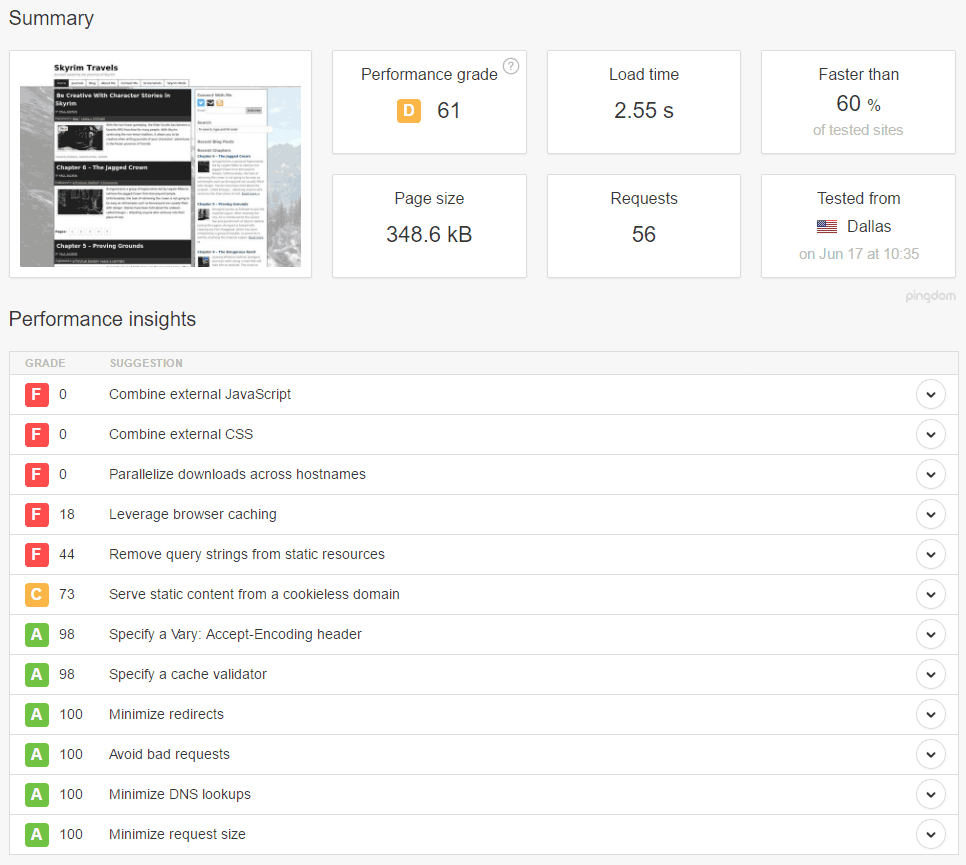
After running the test I got the below result.
Pingdom Test Before Optimization
The load time of the blog was at 2.55 seconds, which wasn’t too bad, but it still was higher than I would have liked it to be. Actually, I was surprised and thought it would be higher.
The performance grade indicated 61 out of 100, which I don’t like. You can see some of the issues in the lower part of the image, with the colour red meaning something could be improved. There were several issues with the performance, and the good news was that many of the issues in red could be fixed easily and with minimal effort on my part.
The one thing I do want you to be aware of when performing tests on your blog is the number of requests that are made to display a page of your blog. The more requests a visitor needs to make, the longer it will take to display the content. Try to reduce the number of requests needed for your blog as much as possible. In the case of my blog, I could reduce the number of requests automatically as I fixed the issues.
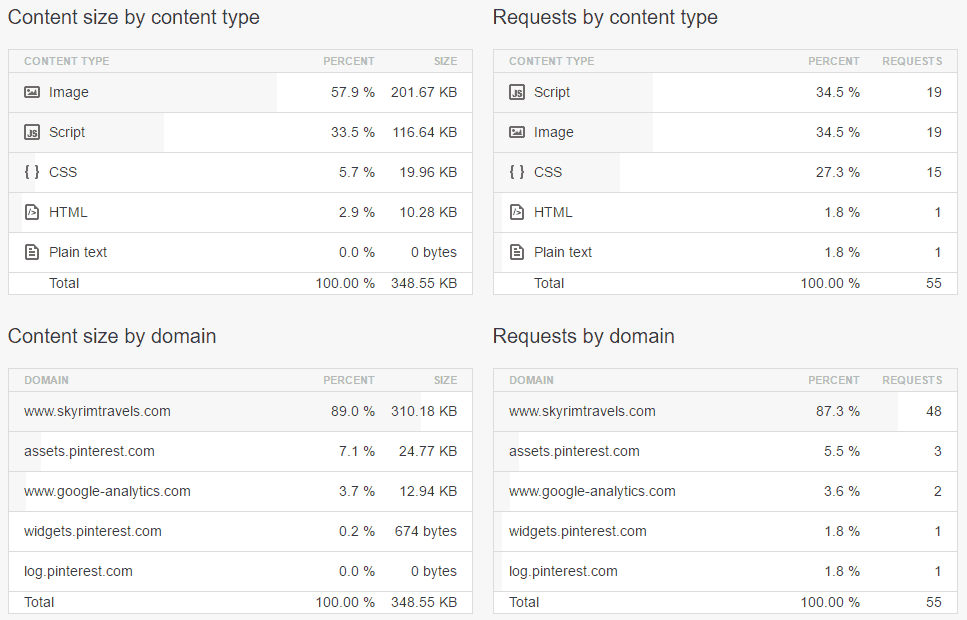
Pingdom Test Before – Content Breakdown
Speaking of requests, the image above helped show me the content for the various requests that are made to my blog. The two tables on the right showed the content type of each request and the domains receiving the requests. From the table I could see that 19 requests were made for scripts and another 19 were made for images. The Skyrim Travels blog does have a lot of images to display, so I won’t worry about those requests, but I could do something about the number of script requests.
Apparently a lot of CSS files (15 requests), are also downloaded from the blog by a visitor. I should be able to also reduce this number, as well.
On the left side we can see the content size by both type and domain. While I won’t worry too much about the size, I should be able to reduce the number slightly. The largest size for content are the images, which I should be able to compress further, but at this time, I do have other options. The scripts and CSS files I should reduce slightly as I perform the optimizations.
Reducing the load time
Now that I know some of the issues that I needed to fix, let’s look at each issue and the solution that I implemented to fix the issue.
Note:
When I did the optimizations for my blog I disabled the Hyper Cache plugin as well as set CloudFlare to Development Mode. This allowed me to see the effects of the changes I was making to my blog. When All optimizations were done, I re-enabled the Hyper Cache plugin and turned off Development Mode in CloudFlare.
Combine external JavaScript and CSS
For my WordPress blog, fixing this issue was fairly easy as it just required me to install and configure one plugin – Better WordPress Minify. I have used other minify plugins in the past, but I find this one has worked the best for me.
I simply downloaded and installed the plugin and BWP Minify appeared on the left from my WordPress dashboard. From there I clicked the BWP Minify option to view the General Options page.
Since I wanted to minify both the JavaScript and CSS files I clicked the Manage enqueued Files tab at the top. When the page to manage the files was first displayed I was shown the following message:
No enqueued files detected.

Please try visiting a few pages on your site and then refresh this page.

You should clear this list once in a while to get rid of files that are no longer being used as this is not done automatically.
I then visited my blog – it doesn’t get much traffic so it would take a while for the enqueued files to populate the lists. Once I viewed a few pages, the two lists were automatically populated.
I accepted the defaults, and clicked the Save Changes button at the bottom. Once the changes were saved, I opened the blog to ensure it was still displaying correctly. Minifying resources such as JavaScript or CSS can affect the look at feel of your blog so it is always best to view multiple pages on your blog, and to try out various aspects, such as commenting, to ensure everything is still working.
Note:
Since I disabled both my caching plugin and CloudFlare, I could see the effect of minifying my JavaScript and CSS files immediately. Had I kept either enabled, then I would have seen the cached version, and not the results of the minified files. Ensure that you disable any caching before viewing your blog after minifying the files.
Once I confirmed my blog was still displaying correctly, I looked at resolving the next issue.
Leverage browser caching
Resolving this item involved editing the .htaccess file on my server. All root folders for your WordPress blogs should have a .htaccess file created. All I needed to do in this case was open the file in a text editor and add the following lines:
The above lines set the cache expiration time as well as the cache control settings. I won’t go into detail about what all the lines do, as they are well documented online. For your blog, you may want to adjust the times and cache settings as you may wish to use different values.
That was all that was needed to enable caching for the files. The next step was to remove the query strings from files to properly enable the caching.
Remove query strings from static resources
This is the last issue that I had to fix. By default, WordPress tends to add the WordPress version to the static resources by appending “?ver=” to each of the files. This has a negative affect on caching, and also one way for miscreants to determine which version of WordPress you are running, and then take advantage of any vulnerabilities in that version of WordPress.
You don’t need to have the version number appended to any of the static resources, so it is best if you just remove it.
Removing the version query string was really easy; I just had to add the following function to my functions.php file in my theme:
Once the function was added to my theme, I reloaded my blog and viewed the source. All static resources no longer had the version query string appended to the end.
One additional change in CloudFlare
I had corrected the issues that were reported by Pingdom Tools, but there was one additional change that I needed to make on CloudFlare to ensure that my blog not only loaded as fast as possible, but also allowed me, once I re-enabled CloudFlare, to preview any new posts without having caching issues.
Since my blog was already in CloudFlare, I didn’t have to go through the setup. So I logged into CloudFlare and selected my blog and then clicked Page Rules at the top. By default, CloudFlare allows me to add three page rules with the free CloudFlare account.
The three page rules that I added were as follows (you will obviously change the URL to match your blog):
URL: *skyrimtravels.com/wp-admin*
Disable Security
Cache Level: Bypass
Disable Performance
URL: *skyrimtravels.com/*preview=true*
Cache Level: Bypass
Disable Performance
URL: *skyrimtravels.com/*
Browser Cache TTL: 30 minutes
Always On: On
Cache Level: Cache Everything
Edge Cache TTL: a month
What the above three rules do is disable any caching when I access the WordPress dashboard (anything in wp-admin), or preview a post (preview=true in the URL). Everything else, like viewing my blog, I use the cache settings outlined in the rule. The cache settings will cause everything to be cached on the CloudFlare servers for one month. Anything that doesn’t have a browser expiry cache, will default to 30 minutes.
So after the browser cache expires in 30 minutes, and a new request is made for the same resource, the resource will be returned by the CloudFlare server instead of blog’s web server. The reason is because there are many CloudFlare servers around the world so regardless of where the visitor is located, it will be faster to download the files for my blog from a closer CloudFlare server than from my host’s server.
To avoid any issues with accessing the login page since it would use the third rule, I also installed the Rename wp-login.php so I could rename it to something like https://skyrimtravels.com/wp-admin-mylogin. It doesn’t matter what you name it as long as it begins with wp-admin so it would use the first rule, and not the third one.
Once all the above changes were made, I returned to Pingdom Tools to rerun the tests.
Reduce the load time of a blog – after
After making the changes I outlined above to my blog I was interested to see what improvements would result from the changes. Needless to say that I was surprised with how much of an improvement was seen once I ran the tests. One thing I should not, however, is that because I had to prime both the WordPress and CloudFlare caches, I had to run the test twice to see the improvements.
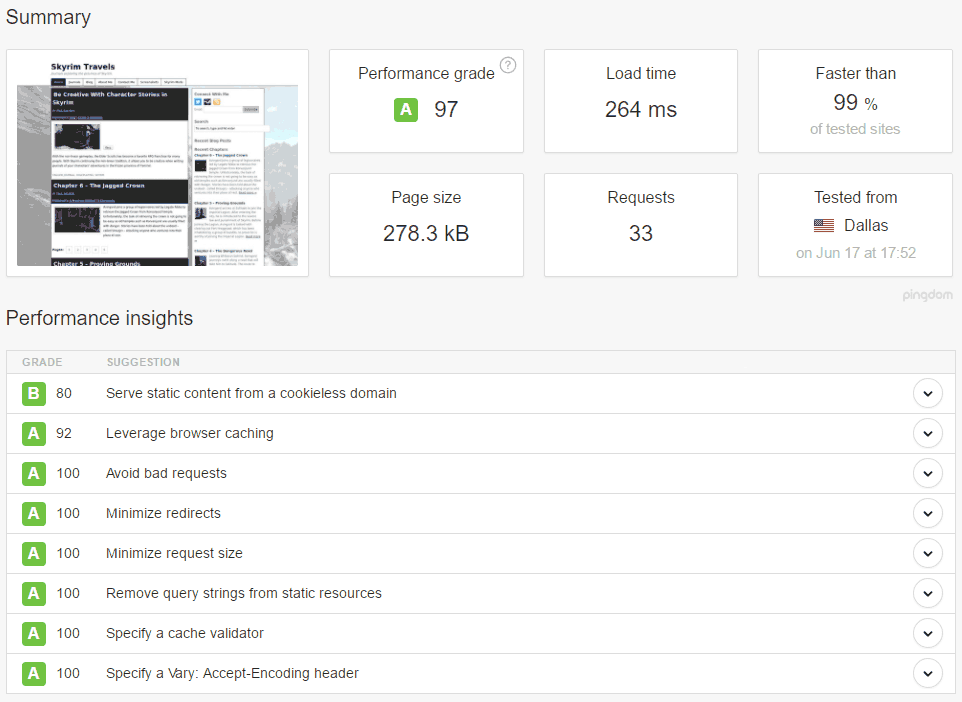
The image below shows the results of the test after the changes to the blog.
Pingdom Test After Optimization
The most notable improvement is in the response time, which is about 90% lower than the initial tests I ran. I ran the test multiple times and all tests reported around the same response time.
The second improvement is in the number of requests – decreased from 56 to 33 (41% decrease). This is a result of minifying both the JavaScript and CSS files into one or two files. The results of the minify also impacted the size of the files being download, which you can see in the page size. The initial test showed a page size of 348.6 KB, while the latest test shows a size of 278.3 KB, which is a 20% reduction in size.
The combination of reduced requests and page size have a drastic effect on the response time of the blog, as it would on any site.
Let’s have a look at the content that is being downloaded from the blog.
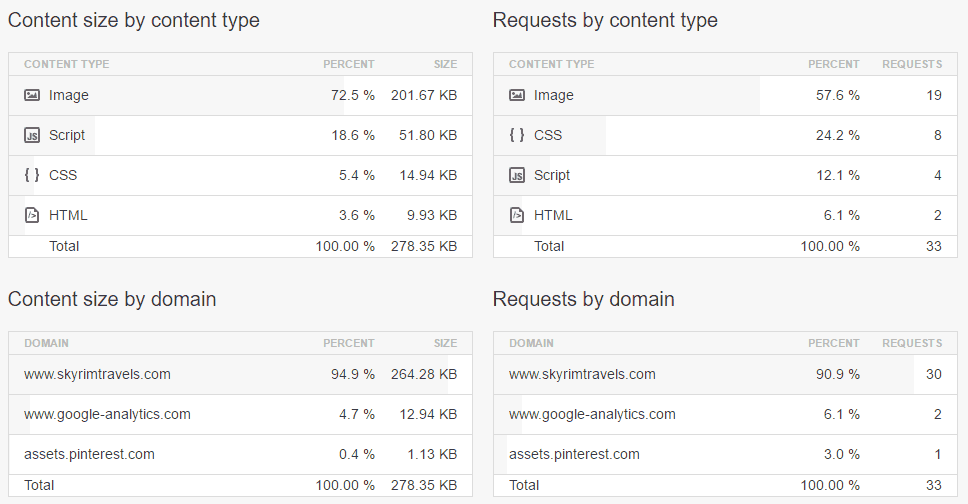
Pingdom Test Before – Content Breakdown
The content information is largely affected by the minifying process for both the JavaScript and CSS files. When the two file types are minified, both the number of files that need to be requested, and the file sizes are reduced. The file size is reduced because the spaces, carriage returns, and comments are removed from the files.
As you can see above, the number of JavaScript and CSS files has been reduced. Both used to be two of the three most requested file types on the blog, with combined requests of 34. Now, after minifying the files, the total requests is 22 – a 65% reduction.
The largest reduction is with the JavaScript files. The initial test had 19 files being downloaded, and the now the requests number 4 (79% reduction). While not have as much of a reduction, the number of CSS files decreased from 15 to 8, which is still a nice 47% decrease in the number of files being downloaded.
As for the file sizes, that has also decrease, as well. The total size of the JavaScript files decreased from 116.64 KB to 51.8 KB, which results in a decrease of 56%. The CSS files didn’t have the same amount in decrease, but it was still a nice change – from 19.96 KB to 14.94 KB (25% reduction).
As I mentioned above, the decrease in both the JavaScript and CSS files are a result of minifying both file types.
With just a few changes made to my blog I have managed to significantly improve the response time for the visitors. There are many ways to optimize a WordPress blog, such as reducing the number of plugins, choosing themes that don’t load a lot of resources, but the changes I applied here can work for any blog, and Website.
Companies invest a lot of money in the software they use for their business. Cloud computing enables your business to access software from anywhere, so long as you have an active internet connection. It is also a safe way of storing and accessing your company’s data.
For those who are not familiar, cloud computing refers to the practice of using a network of remote servers hosted on the Internet to store, manage, and process data, rather than a local server or a personal computer. This means that files can be accessed from virtually anywhere with an active internet connection.
If your business has not migrated to the cloud, it’s time to start making the migration, for many reasons.
Moving to the cloud can benefit your business – here’s how
Cloud storage is the way of the future. In this digital world, no one wants to rely on paper files or the risk of hard drive failure. Now thanks to cloud storage, businesses don’t have to. Cloud storage allows for the storage of more files using less space, without the need for bulky servers. This reduces the need to have a dedicated IT staff on site to maintain servers.
Cloud storage may seem scary, but it brings many benefits, such as:
Reduced costs
Flexibility
Scalability
Data security
Automatic backup
Improved collaboration
Employees can work remotely
In addition, companies also enjoy energy savings, disaster recovery, better business focus and staff resource allocation. There are no files to store and no bulky servers to house. By migrating to cloud storage, companies can focus more on their business and spend less time worrying about data issues. Cloud storage saves money, which accommodates future growth. Your staff can be best used elsewhere, not waiting for a hardware or software issue to happen.
Because data can be accessed from anywhere, you can adjust schedules and tailor work to fit your business needs. This is particularly helpful if your business is open nights, weekends or holidays, when in-house staff would otherwise not be available.
If you’re an organization that writes grants, a cloud-based grants management system can help meet goals, allowing access from anywhere at any time. Next-generation grants management software plays an integral role in organizations meeting their needs.
Moving to the cloud is easier than ever
Moving your data to the cloud is easier than you might realize. If your business is considering this big move, it’s important to do your research. Start by using a trusted vendor to ensure your transition is done properly, and well. You’ll want to hire a company with experienced developers who can determine which things are necessary to move over, and which ones are not worth bothering with.
A good vendor will walk you through the entire migration process, giving you a clear picture of how your data will be secured. At the end of the migration, your vendor should do a test run to ensure all data was transferred over.. They’ll also conduct a dummy traffic test to ensure your site can accommodate the increase in traffic. This step will also help to identify points of weakness that need to be corrected before completion.
Moving to the cloud might be the best decision your business makes in 2019. Start the process and streamline your business data storage process.