We have all been there and felt the sinking feeling in our stomach when we realized we emptied the trash with a file we desperately needed.
Here are some simple steps to follow after you’ve mistakenly deleted data from your hard drive.
After you have realized you deleted files by mistake, you need to limit your activity on the hard drive. Even web browsing writes data to the drive, meaning you could be writing over the deleted files you want to get back. It goes without saying that downloading files is definitely a no no.
In this age of the Internet, many people are trying to find ways to keep themselves protected online, by hiding their IP address, for various reasons. Some may just want the privacy aspect of being anonymous, while others may want to access specific services without being monitored. Privacy has always been at the forefront of technology, and with the Internet, privacy has become a big issue.
There are many reasons why you might want to hide your IP address when accessing the internet. Some of the most common include:
One of the most popular pages on Technically Easy is the post titled Securing Linksys WRT54G Wireless-G Router. In that post I outlined the steps needed to secure these particular wireless broadband routers to maintain your wireless network security.
The one problem I didn’t mention is how to reset the router back to the factory defaults. You may need to do this if you forget your router’s password or made a mistake and you can’t connect to the router. In this post I’ll outline two methods you can follow to reset your Linksys WRT54G Wireless-G router.
Reset Button
Note:
Resetting the router to the factory defaults will delete any changes you have made to the router, including any security settings. This should be used as a last resort.
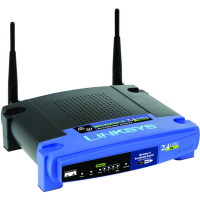
The first method involves simply pressing a button located on the back of the router. The image below (courtesy of Linksys) shows where the button is located.
Linksys WRT54G Reset Button Location
To reset your router, use the following steps:
Press the reset button for 30 seconds.
The settings should now be returned to the factory default settings, meaning any changes you had made would be deleted.
Open up your Web browser and enter “192.168.1.1” in the address bar.
For the login, leave a blank ID and enter “admin” as the password.
The second method involves logging into the Web administration pages of the router. Use the following steps to reset the router using this method:
Open your Web browser and enter the IP address of your router. By default, the address is “192.168.1.1”.
Enter your user ID And password when prompted. Hopefully this has been changed, but if it hasn’t, the default is no ID and “admin” as the password.
At the top of the Web page, click “Administration” and then “Factory Defaults”.
Beside “Restore Factory Defaults”, click “Yes”.
Now click the “Save Settings” button at the bottom of the Web page.
Your WRT54G wireless router should now be reset to the factory defaults. Ensure you follow the steps outlined in Securing Linksys WRT54G Wireless-G Router to secure your router and for securing a Linksys wireless network.
Summary
This post has provided two methods you can use to reset your Linksys WRT54G Wireless-G router. If you are having problems with your router, try to reset the Linksys WRT54G to the factory defaults, and then make the changes again and see if the router starts working again.
You should also consider using a VPN once you have reset your router. Over at VPNTeacher.com you can find out how to install and use a VPN on your computer.
There may be times where you hare having trouble with your WRT54GL router, which may require you to reset the Linksys WRT54GL wireless-G router. There are two methods of performing such an action, so which method you choose is up to you.
I recently wrote a post outlining the steps needed to secure a Linksys WRT54GL Wireless-G router. Now I will detail how you go about resetting the router if you do need to revert back to the factory defaults. I will explain the two methods you can use to reset the wireless router.
Autodesk is a company that is known more for making industry level powerful 3D design tools like AutoCAD over mainstream graphic design apps.
It does have a few apps that offer designers immense possibilities for making professional level sketches though. Of late, the company has decided to focus on making cloud based apps.
With time, Cloud computing is becoming popular with various types of internet users, including design professionals.
As a matter of fact, internet users are only limited by speed of their web access devices to leverage benefits of various cloud based services and apps.
Don’t you love it when you find a shiny new application?
Something that gives you new abilities to bend light and matter. Something that adds to your list of super powers.
Do you scan through top ten lists of applications looking for tips about apps you haven’t tried yet? Are you an App Junkie hanging out for your latest fix of apptastic goodness?
For many people Windows is synonymous with viruses, malware and security vulnerabilities. For many years Apple and Unix/Linux users have touted how they don’t have to worry about viruses or malware.
Windows users have, however, enjoyed the fact that their system has the most compatibility for hardware and software than any other system. This, unfortunately, has also been an issue as Windows users have always had a more open system to allow for such compatibility, which has allowed viruses and malware to propagate easily.
With the 10 tips outlines below, I will show you how you can run your system in a much more secured way, to the point where you can, hopefully, make viruses and malware threats a thing of the past. The good news is most of you probably won’t even need to spend a dime to make your system much more secure.
Since the days of DOS, we have been told to install an antivirus program on our computers to keep our computers protected from viruses and other malicious software. Over the years, though, malware developers have become more advanced in their development of malware to the point where many antivirus programs are constantly playing catch up, or have failed to find malware installed on a computer.
Antivirus programs have also become more advanced in how they have detected malware, but have fallen short of protecting a computer 100% from various malware. In reality, most antivirus products are “reactive protection” from malware, and not “proactive protection”, meaning that they are able to find and remove malware once the malware has infected computers. While antivirus programs are still an important piece of securing your computer, it is now recommended to have a layered defense when it comes to security.