Search results for: “label/Web Site – Review”

  • Server Header Responses 101 [Infographic]

    Server Header Responses 101 [Infographic]

    When you request a web page online there may be times where you may see an error page appear on the screen. While it can be frustrating to see such a page, mainly because that means the content you were looking for won’t appear, the error number that appears actually has meaning to the owner of the web site.

    There are many different status codes defined for requesting and sending data online, and all pages sent from the Web actually return one of several different status codes.

    (more…)

  • Tips and Tricks to Stay Undercover on Internet with VPN

    Tips and Tricks to Stay Undercover on Internet with VPN

    When going online most people think they are fairly anonymous. They visit websites, login to social media websites, check their email and more without much thought on their virtual footprints. Unfortunately, those surfing without protection, such as provided by a VPN service, are easily tracked. Just what can be seen when you are online?

    (more…)

  • Privacy Policy

    If you require any more information or have any questions about our privacy policy, please feel free to contact us by email at admin AT technicallyeasy.net.

    At technicallyeasy.net, the privacy of our visitors is of extreme importance to us. This privacy policy document outlines the types of personal information is received and collected by technicallyeasy.net and how it is used.

    Log Files
    Like many other Web sites, technicallyeasy.net makes use of log files. The information inside the log files includes internet protocol ( IP ) addresses, type of browser, Internet Service Provider ( ISP ), date/time stamp, referring/exit pages, and number of clicks to analyze trends, administer the site, track user’s movement around the site, and gather demographic information. IP addresses, and other such information are not linked to any information that is personally identifiable.

    Cookies and Web Beacons
    technicallyeasy.net does not use cookies.

    Some of our advertising partners may use cookies and web beacons on our site. Our advertising partners include Google Adsense, Linkshare.

    These third-party ad servers or ad networks use technology to the advertisements and links that appear on technicallyeasy.net send directly to your browsers. They automatically receive your IP address when this occurs. Other technologies ( such as cookies, JavaScript, or Web Beacons ) may also be used by the third-party ad networks to measure the effectiveness of their advertisements and / or to personalize the advertising content that you see.

    technicallyeasy.net has no access to or control over these cookies that are used by third-party advertisers.

    Google, as a third party vendor, uses cookies to serve ads on your site. Google’s use of the DART cookie enables it to serve ads to your users based on their visit to your sites and other sites on the Internet. Users may opt out of the use of the DART cookie by visiting the Google ad and content network privacy policy.

    You should consult the respective privacy policies of these third-party ad servers for more detailed information on their practices as well as for instructions about how to opt-out of certain practices. technicallyeasy.net’s privacy policy does not apply to, and we cannot control the activities of, such other advertisers or web sites.

    If you wish to disable cookies, you may do so through your individual browser options. More detailed information about cookie management with specific web browsers can be found at the browsers’ respective websites.

    Paul Salmon is a participant in the Amazon Services LLC Associates Program, an affiliate advertising program designed to provide a means for sites to earn advertising fees by advertising and linking to amazon.com.

  • Ways to Boost Your Website Positioning Methods

    Ways to Boost Your Website Positioning Methods

    You cannot find any serious technique to explain advance SEO techniques from various SEO services worldwide. It’s very large plus developing for many people to learn exactly how they run, it is usually characterized by employing the condition of witnessing a person’s web pages in the view with Google. Just what exactly cause it to boost is definitely the types of procedures to get inclusion compared with alternatives or extra primary basics that will quietly have a few distinctive gear plus options.

    Fed up of the same kind of website positioning procedures last year? Hence, let us discuss the ways to boost website positioning methods for 2012. This will provide you with extra strategies and ways plus ways to take you certainly better SEO projections.

    (more…)

  • How Apple Almost Ruined my Business Model

    How Apple Almost Ruined my Business Model

    It was 4 days before the launch of my new website and super-mobile friendly website, before disaster hit hard. I had done the regular testing on Chrome, Firefox, and Safari on my Macbook. I dusted off my old Windows based Netbook to test Internet Explorer. To my surprise, there were only a few small display errors. I expected it to almost turned upside down on I.E.

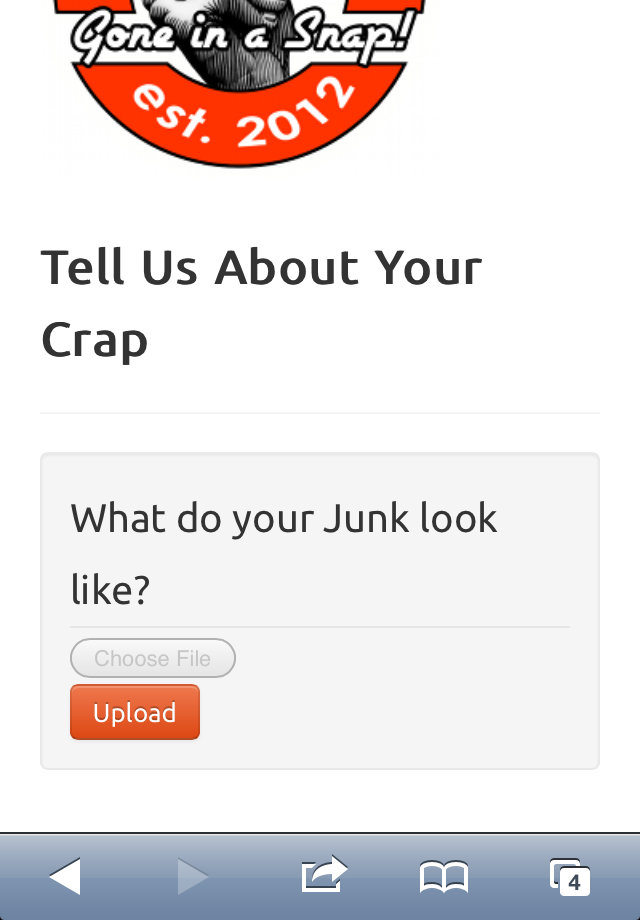
    Feeling confident, I decided to check it do a quick test on my iPhone. Hey, it worked for Safari on my Macbook so, technically speaking, it should work on my iPhone as well, as it is just a mobile version of Safari. I got to the part of my website where I upload photos, and the upload button was disabled (grayed out). I thought there must be a simple fix to this. That’s where I was dead wrong.

    (more…)

  • Quality Assurance: Getting Your Website Onboard

    Quality Assurance: Getting Your Website Onboard

    Having a good website requires a lot of effort from the UX and UI design team. However, you till have to perform some quality assurance so that your page is near-perfect. Here are some things to check to ensure that your website is performing better than your competition.

    Accuracy to the Original Design

    When doing a quality assurance check on your website, you want to make sure that all design elements are consistent. Compare your original design to the final product to ensure that the coded version looks like the previous design element that you love.

    Keep in mind that all of the adjustments might have been discussed during this process. But you and your team need to know them so that there are no hidden surprises. Are the font styles correct? Do every bulleted point look how you expected them to look? If there are any rollover effects, check to see that they’re working beautifully.

    Content

    You should check to make sure that you have all of the pages needed for your debut site. And make sure that all written content has the proper spelling, grammar, etc. Your audience views your content regularly, so you have to ensure that it’s been refined through your quality assurance team.

    Privacy Policy

    Did you know that your site is required to have a Privacy Policy? Some web developers will have a standardized version of your site, but make sure it’s there. If you are finding any sensitive information, look to see if your site requires any specific language.

    Testing

    If you have any custom or e-commerce components, then you need to test them! We suggest that you try a processing payment and make sure that it gets back to your account through the third-party gateway.

    Keep in mind that if you sent a charge through the system, you will have to go back and refund your money later.

    Links and Menus

    Click on all of the links and menu items to make sure they go to the right location and that there are no pages with missing content. Links might also include PDFs and documents that you’re offering for download on the websites in exchange for the user’s email address. You can either open up a new window or check links that open from within the site’s window.

    Images

    When conducting a website qa audit, you want to look at all of the images on your site and make sure that they’re picture perfect. Check for any watermarks and ensure that each image has aesthetically pleasing spacing and look the way they should.

    Conclusion

    Overall, your website qa process is crucial during the final stages of web development. It helps you ensure that your page is free of errors, running up to speed, and the content is organized. Thus, you should use it so that you can keep your viewers engaged to your site!

    Do you have any questions about checking your website’s quality?

    Tell us in the comments below.

  • Question: Are You Cut Out to be a Web Designer?

    Question: Are You Cut Out to be a Web Designer?

    Do you want to be a web designer and are thinking about what you need to be one? Like all jobs, even this one has certain qualities that you require in order to make it big. In this big wide web world, there are thousands of web designers looking to make their mark. You have to really stand out in order to make it big. Here are a few skills that you should ideally possess to be a good designer. Obviously there are no hard and fast rules though.

    (more…)

  • 5 Tools to Secure Your Windows Computer

    5 Tools to Secure Your Windows Computer

    Since the days of using DOS, personal computers have always had the risk of being infected with malicious software. Over the years, malware has evolved from basic viruses, to rootkits, and now ransomware that encrypts your data. With each new release of malware, it seems anti-virus software developers are always playing catch-up to make sure their software can protect a computer from the new malicious software.

    The fact that anti-virus, or anti-malware, software has always been reactive to the changing threats has made such software unreliable, at times, to protecting a computer. While I am an advocate of using anti-malware tools, my entire computer security policy isn’t based on those tools alone. Computer security today requires more protection depth than just an anti-malware tool and a firewall.

    To help with creating a more detailed security policy, I have compiled my list of 5 tools to secure your Windows computer. I use each of these tools, and feel confident in recommending them.

    (more…)