Search results for: “label/Web Site – Review”

  • Speed Up Your Web Site By Using CSS Sprites

    Speed Up Your Web Site By Using CSS Sprites

    If you own a web site or blog, chances are you have thought about how to make your pages load as fast as possible. This is an obsession with many, while a learning experiencing for others. I am one of those that look for ways to make my blog display faster. I have tried and used many different tactics, including changing settings for the browser cache, gzip compression, WordPress caching plugins, reducing the number of graphics, and reducing the number of third-party widgets that appear on my blog. The more that has to load, the slower a page will become.

    When I created this new WordPress theme, I wanted to try something new – CSS sprites. CSS sprites are used by some of the larger web sites to reduce the number of image downloads that are needed to display a web page. While I am not an expert by any means, I have managed to get some of the common images that appear on this blog to load from an image sprite.

    (more…)

  • Review: The Path To Total Financial Freedom

    There is much information on the Internet today that discusses how to make money online. Everyone appears to have a method that works for them, but what it all comes down to is hard work and dedication.

    In this review I look at, not only a ways of making money, but also of increasing your traffic and online presence as well. This week I look at the blog The Path To Total Financial Freedom.

    The Path To Total Financial Freedom

    Design 2 stars

    When I first viewed the blog, I noticed that it consisted of a left navigation sidebar and a content section. As I scrolled down the page I quickly realized that the design of the blog was the weakest part of it.

    Although there is a navigation bar on the left, it didn’t help provide an easy means of navigating through the blog. A blog will usually consist of a category list and an archives selection method. Although there is an archives list further down the page, I had trouble finding anything that resembled a categories list.

    The sidebar was confusing as it consisted of many jumbled and unorganized images that may have some meaning to the blog, but I had difficulty associating them with it. If the navigation bar was more organized, it would make moving around the posts easier.

    The home page itself contains much information for a visitor provided in many posts. The downside of this, however, is that it increases the page size dramatically. Checking the properties of the page, I noticed it came in at a whopping 173KB, and that is without the images. Reducing the number of posts displayed on the home page, and including a nice navigation bar will help the design greatly.

    The design flaws show up in the posts themselves, as I noticed some posts had blue links, others had light green links that were hard to read, while others even had red. Being consistent with the link colours using CSS can make them easier to understand for visitors.

    The footer is just as confusing as the sidebar as it is a jumble of links and images.

    The design of the blog is by far the weakest part of the blog, but one that can be easily fixed with minimal effort.

    Focus 4.5 stars

    The focus of the blog is easy to determine since the author has conveniently provided a short definition below the title: “A Guide on how to succeed with the amazing Passport To Wealth Business Opportunity”. The posts he has written maintains this focus as the posts provide tips and tricks on succeeding the online business by increasing traffic and your online presence.

    To strengthen the online business called “Passport to Wealth”, the author uses it in the title of various posts. Although he has included the name in the title, many of the tips the author has provided can be used for various online opportunities as well.

    Overall, the focus of the blog is well defined and represented in the various posts by the author.

    Content 4 stars

    The content of The Path To Total Financial Freedom can at times be nice and summarized, while other times it can be quite long. For the long posts, it can take some time to download, especially if they are included on the same page. It was much easier to read the smaller posts as the author nicely summarizes the important points nicely.

    The posts in general focus on increasing traffic, and focus on such Web sites as Alexa, and Google. Many of the tips provided in the posts can also be used for other online opportunities, which makes this blog a valuable resource for generating traffic.

    The posts the author has written on the blog do provide some useful information, but finding them can be quite difficult because of the current navigation available at this time.

    Spelling and Grammar 3 stars

    There are a few spelling and grammar mistakes in several posts that could cause a visitor to go back and reread the sentence again. For the most part, however, the posts are easy to read and understand.

    Overall 3.5 stars

    The Path To Total Financial Freedom does have a clear focus and well written posts that do provide a visitor with many tips and tricks. The design of the blog, however, will need some major rework to make it easier for a visitor to retrieve the information they are looking for. Restructuring the navigation sidebar will go a long way to making the blog better.
  • Optimizing The Benefits Of Web Images For Your Website

    Optimizing The Benefits Of Web Images For Your Website

    Web images are akin to a double-edged sword with conflicting sides. One helps you fight but the other fights against you. Whereas they are important in increasing rankings on search engines and viewership by users they can be what makes users readily click on the back button without second thought.

    (more…)

  • WordPress Plugin: GrowMap Anti-Spambot Plugin Review

    WordPress Plugin: GrowMap Anti-Spambot Plugin Review

    I have been using the GrowMap Anti-Spambot Plugin (GASP) plugin for a few weeks now, so I decided to write a review about the plugin. Most blog owners have issues with spam comments on their posts. It is a fact of life when owning a blog – you will eventually start receiving spam comments. While it is annoying to receive the spam, there are many plugins available that can help rid your blog of this nuisance.

    I have tried many plugins to reduce, and eliminate the spam I get on Technically Easy, and a few weeks ago I switched to GASP. The process GASP uses to stop spam seems like such a simple concept, but then again, sometimes the simple concepts tend to work the best.

    The GrowMap Anti-Spambot Plugin

    Stop Spam

    I had recently wrote a post where I outlined the 3 plugins I use to stop spam, where I first learned about the GrowMap Anti-Spambot Plugin from Ileane at Basic Blog Tips. I am always curious to test out some plugins that people have used and liked, so I decided to try out GASP.

    I installed the plugin and then disabled both Akismet and the Conditional Captcha plugin. The fact that I am able to disable two plugins is great, since having too many plugins loaded can slow down a blog.

    After testing out the GASP plugin for a few weeks, I can honestly say that it works, and I do mean works. I have had zero, zilch, nada, nothing, not a single spam comment within those few weeks. The best part is that without Akismet running, I haven’t had valid comments moved to my spam folder automatically.

    How does GASP work? Let’s take a look.

    GrowMap Anti-Spambot Plugin – The Simple Way to Stop Spam

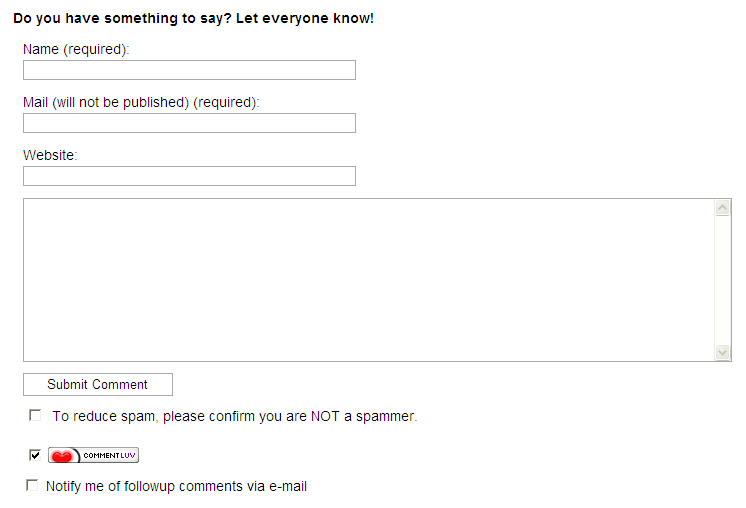
    Andy Bailey from CommentLuv fame is the one who wrote the GrowMap Anti-Spambot plugin. GASP works by requiring those that wish to leave a comment, to check a checkbox before submitting the comment. Just a simple checkbox and no hard-to-read captcha required. If the checkbox isn’t checked, the comment isn’t saved.

    Growmap Anti-Spambot Plugin - Comment Checkbox
    Growmap Anti-Spambot Plugin – Comment Checkbox
    (Click to enlarge)

    There is also another trick to help stop spam. Since many of the spam comments are created by bots, the bots are usually programmed to fill in all the fields on a form with specific information. The GASP plugin creates a hidden field that can’t be seen by normal visitors. A bot, however can see the hidden field. The bot will then fill in the hidden field, which indicates that a bot is writing the comment. Since the field is filled in, the comment is flagged as spam and discarded.

    The only downside is that the visitor needs to have Javascript enabled in their browser. Since many websites use Javascript, most visitors tend to have Javascript enabled by default.

    I highly recommend you install this plugin. While the GrowMap Anti-Spambot plugin uses such simple ideas to stop spam, it has been very effective at completely preventing spam comments from my blog.

  • Sennheiser RS120 Wireless Headphones Review

    Sennheiser RS120 Wireless Headphones Review

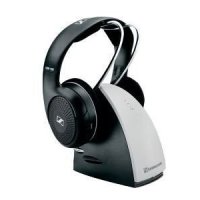
    I recently bought the Sennheiser RS120 wireless headphones so I could sleep next to my wife when she watches TV late a night. I was looking for a set of wireless headphones that weren’t too expensive, but still had decent sound quality. After performing some quick research, I eventually decided on the Sennheiser RS120 wireless headphones.

    While wireless headphones have been available for years, I hadn’t owned any before purchasing these headphones. I didn’t know what to expect in terms of quality so I couldn’t compare the Sennheiser RS120 to other headphones. Because of this the review is based solely on what I think about the Sennheiser RS120 without any comparison to a previous product.

    (more…)

  • Bitdefender Internet Security 2012 Review

    Bitdefender Internet Security 2012 Review

    While I have always been an advocate for using free anti-virus, I decide to give Bitdefender Internet Security 2012 a try. I have had bad experiences with paid, large security software that included an anti-virus, anti-spyware, and software firewall in the past, so I installed Bitdefender Internet Security 2012 onto my computer with great trepidation.

    I have seen good reviews for Bitdefender in the past, so I was curious at how the security software would perform compared to not only free products that I have used, but also those larger paid security packages. Perhaps Bitdefender Internet Security 2012 can finally bring me over to the pay-for-security-software group that I have avoided for the past 10 years or so.

    (more…)

  • Mercalli Easy Video Stabilizer Review

    Mercalli Easy Video Stabilizer Review

    Mercalli Easy Video Stabilizer is an application that I hadn’t heard about until recently when I was asked to have a look at the software. While I have done video editing in the past, I haven’t actually tried to stabilize any of my videos – at least the videos that aren’t shot using a tripod.

    From experiences with video editing applications in the past, I know that many of such applications can be complex and at times they could have a fairly steep learning curve. I wasn’t sure what to expect from Mercalli Easy Video Stabilizer in terms of difficult the software would be to use, or how well it would perform. With that in mind I downloaded, installed, and launched the application.

    (more…)

  • Garmin Nuvi 1490LMT Review – Great GPS Device with Lifetime Maps

    Garmin Nuvi 1490LMT Review – Great GPS Device with Lifetime Maps

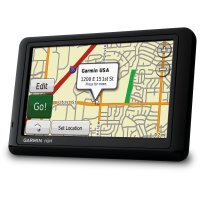
    Every single Garmin Nuvi GPS has its own charm and appeal and this 1490LMT is no different, especially considering how low the price is. Garmin are the world leader when it comes to GPS devices, and it’s easy to see why when you look at this new unit. It manages to combines some very powerful features with superb routing accuracy and a sleek modern-looking design that sets it apart from the competition.

    The Nuvi 1490LMT is even more compelling as a purchase when you see how easy the user interface is to use. Read the full Garmin Nuvi 1490LMT review below, as well as details on how you can save money with a Garmin Discount Code for 2012.

    (more…)