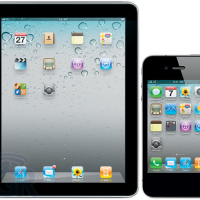
Apple is an American based international corporation know for it’s innovative communication based designs that range from various consumer electronics including phones, computer software, personal computers, and portable media devices. The Macintosh line of computers has been Apple’s most prosperous hardware designs, and have been followed up by other innovative products such as the iPhone, the iPad and various other technologies. The iPhone and iPad has played major roles in the advancement of next generation communication with creative technology.
Search results for: “label/Web%20Site%20-%20Design”
-
Bitdefender Total Security 2013 Review
I enjoyed using and reviewing Bitdefender Internet Security 2012 earlier this year, and a few months later I had the same opportunity at reviewing Bitdefender Total Security 2013. I was excited to be given the chance at looking at the newest version since I enjoyed using the previous one, and haven’t had any issues with it running on my computer.
After about a month of using the software I did notice that it was still a great security suite for a computer, and not just for desktops, but for notebooks and laptops as well. For those that are interesting in installing Bitdefender Total Security 2013 on a laptop, there is a nice new feature you may be interested in.
-
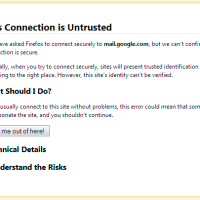
Mozilla Firefox – This Connection is Untrusted
As I mentioned in my review of Bitdefender Total Security 2013, I ran into an issue where Mozilla Firefox would display a certificate error on my screen when I accessed my Gmail account. In fact the error appeared whenever I access any page within Google, and only Firefox displayed the error, and no other Web browser.
After some quick research into the problem, I managed to trace the problem to Bitdefender Total Security 2013, and then find what tool within that security suite was causing the problem. Below are the steps I used to solve the issue so I could access Gmail from within Firefox.
-
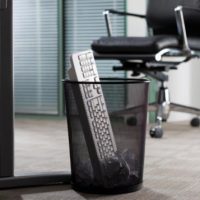
Goodbye Keyboard, Goodbye Mouse
It’s gonna happen eventually…but when? When are we going to stop using these rudimentary tools – the computer keyboard and mouse. Just look at them. They look like they are straight out of the early 1900’s and well…they are.
At least, the keyboard is. The Keyboard has its roots in typewriter technology which was first in use in the late 1800s and early 1900s. Video terminals for computing along with keyboards were used in the 1970s. The mouse was first used for personal computers around 1984.
So here we are almost 30 years later and technology hasn’t changed a whole lot for computer input. Sure – I’ll admit that keyboard and mouse technology has changed a bit with optical mice, wireless keyboards and other minor advancements in technology. But I’m still punching keys to write this article and I’ll roll my mouse around my desk and click the buttons to post the article to this website.
-

Websites For People Who Have Already Made It
When you look at all the people who work online and have websites, generally they will fall into only a few demographics. They tend to be young people, mostly male, who aren’t overly happy in their jobs and are trying to get out, or younger still who are trying to ‘make it’ online before they have to ever go into the world of work. These are the people who see working online as a chance to make their dreams happen – to make some money, maybe to get some fame and hopefully impress some girls/guys along the way too.
The good news is that if you know what you’re doing then this really is a way to achieve those things and there are plenty of examples of people who have – I’m not saying that you should stop chasing the dream if that describes you, rather what I’m doing is calling other people to join in.
Specifically I’m talking about the people who have already ‘made it’ – the celebrities, the wealthy business men and women and the people who were just fortunate enough to have been born with a silver spoon in their mouth. Why? Because those groups are perfectly poised to literally take over the web and to make it big time and if they aren’t acting on that ability then they’re currently squandering a position that most of us other webmasters would give our left leg to be in. Allow me to explain…
-

Server Security, The Ten Commandments
In many organizations, they’re the most unsung of heroes. Quietly whirring away in their rack, hosting your web site, running your email, storing your data. Yet please spare a thought for your servers. Without them, your business would not be a business. And it’s not as if they’re living in the safest of worlds these days.
-
How Virtual Private Networks Can Protect Your Mobile Device
Needing a safe way to communicate through the World Wide Web has never been more crucial. You no longer need a computer to log on. Your handheld mobile device can fit in your pocket and go pretty much everywhere with you, which means you’re that much more vulnerable to hackers since you’re spending more time on these networks. There are several ways to safeguard yourself, however, and here’s a good one to read up on: VPNs.
-

How to Remove Duplicate Items from ‘Sent Items’ Folder in Outlook?
Outlook is a place where you create your to-do list, maintain calendar of events, and access your work emails, and if you want your personal emails like email messages of Gmail there, then you need not to worry. Outlook is a versatile email client and with various other useful features, it facilitates you to set up your Gmail account in Outlook very easily. After setting up your Gmail profile in Outlook, you can access all incoming and outgoing emails in its web interface as well because they are also stored and archived there. However, this feature of Outlook at times creates troubles when you start getting duplicate emails in “Sent Items” folder.
This situation occurs as you are sending emails via SMTP server in Gmail and configured Outlook in a way that it saves the copy of every sent item. Since emails routed via SMTP server are saved in the ‘Sent Items’ folder and as you have checked the option to save the copy of sent item in Outlook, thus a copy of every sent email is saved by Gmail and other by Outlook. However, neither the recipient nor the web interface of the Gmail gets two copies of this sent item.
Best way to work around such situations is sending emails through the SMTP server of Outlook (i.e. email client) instead via SMTP server of Gmail. Other way could be disabling the option to save a copy of sent items in Gmail account.