Why You Should Buy Docking Stations for Laptops

  • Buffer
  • Pin It
  • Sharebar
  • Buffer
  • Pin It

Docking stations for laptops serve a variety of functions that cater to individual needs. Any laptop user should use this article to learn about the different types of docking stations for laptops and purchase one that compliments their own personal laptop usage. A regular laptop experience can be completely transformed through the use of a docking station.

There are a wide range of docking stations for laptops, but the devices generally fit into at least one of five categories. Many docking stations for laptops are universal and multifunctional, but there also also specific brands and models of docking stations for laptops with more specified abilities.


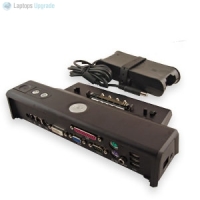
docking station for laptops 256x256 Why You Should Buy Docking Stations for Laptops

What do Docking Stations for Laptops Offer?

Docking stations sometime refer to computer stands, which are devices that lock a laptop into a position more physically similar to a personal computer experience. These can be especially beneficial for users that spend long amounts of time working on a laptop, reducing back, eye, and neck strain. Computer stand type docking stations also enable the use of specialized keyboards, expanding the capabilities of the laptop.

Converter docking and breakout docking stations are docking stations for laptops that enable the addition of multiple functions to the laptop, such are providing memory card readers, expanded USB ports, and so on. This optimizes the capabilities of a laptop while both emulating and improving on the capabilities of a desktop personal computer.

Port replicator docking stations are devices that link with the laptop and offer the same number of external ports as the laptop itself. However, the usage of a port replicator docking station assists in the event some of the ports on the laptop don’t work or are placed inconveniently. These are especially useful with laptops that have multiple users.

Traveling with Docking Stations for Laptops

Mobile docking stations are intended for travel, especially use in a car. Some have locking abilities that prevent laptop theft, and most offer secure connections so the laptop isn’t damaged during transit.

Docking stations for laptops generally protect a laptop, provide excellent heating and cooling protection, and stabilize the laptop computer for optimal use. Docking stations for laptops usually provide the stability to simulate a desktop personal computer experience while maintaining the mobility of a laptop – the owner can choose whatever he/she is most comfortable with at the time.

Docking stations are more than an accessory – they are an investment that expands the laptop user experience. Docking stations for laptops are convenient, multifunctional, useful, and can expand the life of a laptop from undue wear and tear or overuse of ports.

 Why You Should Buy Docking Stations for Laptops

About Paul Salmon

Paul Salmon is the founder of Technically Easy. He is a an experienced PC user, and enjoys solving computer-related problems that he encounters on a regular basis.

Facebook | Twitter | Google+

Tags: ,

You may also like:

Mini Laptop Computer

Advantages of Mini Laptops

MacBook Pro

3 Best Current Laptops of 2011

The Best Laptops of 2011 Reviewed

The Best Laptops of 2011 Reviewed

No thumbnail image

How to Buy a New Computer

13 people had something to say about “Why You Should Buy Docking Stations for Laptops”:

Comments


  1. Just knew that we also need docking stations for Laptop. I always thought that we only need docking station for Tablet PC or Cell Phone.
    Dana recently posted…Evernote- Notes The Ideas via Cell Phones and Access from EverywhereMy Profile


    • Docking stations for laptops are mainly used by businesses. The docking stations are usually kept at the employee’s desk and could be connected to an external monitor, mouse and keyboard. When the employee is at their desk they simply plug in the laptop into the docking station, and can automatically charge the battery and use the monitor, mouse and keyboard with the laptop.


  2. LOL – Never know that I need this kind of stuff as well.

    its nice find out.


    • I have been using docking stations for years at work. They aren’t as popular for home users, but if you like to use a desk at times, you can easily plug a monitor, keyboard, and mouse into the docking station, and then connect the laptop. This way you can use your laptop like a desktop. It takes a few seconds to connect the laptop to a docking station.


  3. I would like to set up a docking station for my laptop. This would be at the same desk as my desktop computer and realized that in whenever I wanted to use my home computer and monitor that I would have to disconnect from the station and reconnect to the tower. Is there a way to toggle the connections between the two so as not to connect/disconnect each time?


    • You may want to look into purchasing a KVM switch. These devices allow you to use a monitor, keyboard, and mouse with multiple computers without having to disconnect and reconnect the individual devices.


  4. Hm…Thanks for sharing this. I was thinking whether to buy it or not, and what can i get from it if i decided to buy it.
    Andrew Walker recently posted…Who Loves Coffee has to try the Cuban OneMy Profile


  5. I ordered a refurbished Lenovo B560-433028U laptop today and have been trying to find a compatible port replicator or docking station. I’m not having any luck. Can anyone help? Thanks.


    • Have you tried searching Amazon or eBay for the Lenovo B560 docking station?


      • Yes, I tried both to no avail and Lenovo’s web site was no better. All I can come up with is replacement parts — keyboards, screens, memory, etc. It almost seems that no docking station exists for this model. Do you know of any after-market (generic) products that will do? Thanks.


  6. There is no good list online of laptops that have docking ports. You basically have to go to each mfg website and search out business grade laptops that have the port.


    • Docking ports can be hard to come by. The manufacturers website may have them, or if you laptop is a few years old you can always try eBay.

Do you have something to say? Let everyone know!

Commenting policy: All comments are moderated for spam. You must use your real name and not your website name or keywords. If a comment is deemed to be spam, then it will be deleted or edited. Links to your website within the comment body is not permitted, but you are free to use CommentLuv to add a link to your latest post. If you wish to add a link to your website, you can always contact me about submitting a guest post.


CommentLuv badge
This blog uses premium CommentLuv which allows you to put your keywords with your name if you have had 5 approved comments. Use your real name and then @ your keywords (maximum of 3)

Previous Post:

Next Post: