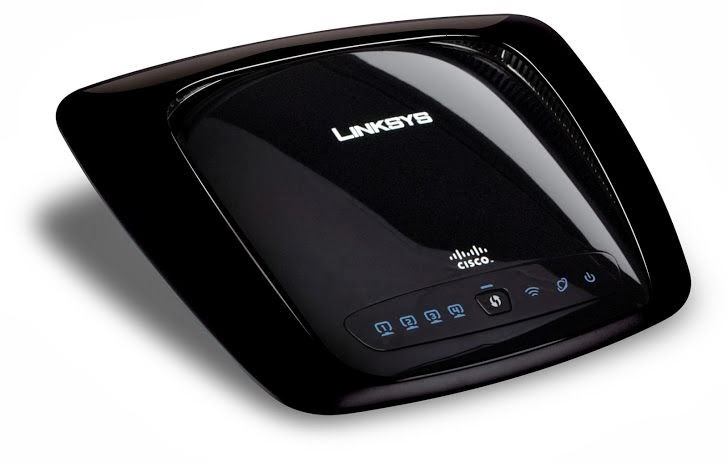
Learning to reset the Linksys WRT160N wireless-N router is important if you currently change the settings within the administrative pages. The reason it is important is because one wrong setting change could make it difficult to access the Internet or the administrative pages of of the router.
If you need to start over with your router, one solution is to reset your router back to its factory defaults. This means that you return all the settings on the router back to what they were when you first purchased and setup the router. This post will explain the two methods you can use to reset the Linksys WRT160N wireless-n router.
Using the Reset Button
Note:
Resetting the router to the factory defaults will delete any changes you have made to the router, including any security settings. This should be used as a last resort.
The first method involves using the reset button that is located at the back of the router. It isn’t hard to reset the router this way, but does require physically being in the same location as the router.
To reset the router using the reset button, use these steps:
- Look for the red reset button at the back of the router.
- Press and hold the reset button for approximately 5 seconds.
Reset the Router Through the Administrative Pages
Note:
If you don’t know the user ID and password to access your router’s administrative pages, then you will need to use the first method to reset your WRT160N router.
The second method involves logging into the administrative pages of your router. This can be done from anywhere that you can connect to your router. While not complex, there are a few more steps than using the reset button.
- Log in to the router’s administrative pages.
- Click the “Administration” menu option.
- Next, click “Factory Defaults” from the sub-menu.
- Click the “Restore All Settings” button on the screen.
Regardless of which method you use to reset your router, it is important to secure your router after it has been reset.
| |


19 Comments
How do you REBOOT (not reset) it remotely. SAVE CHANGES doesn’t reboot it.
Simply press and hold the reset button the router for 30 seconds. Release the reset button and wait for 30 seconds. Power cycle the router and wait for router to turn back on.
I was working as a technical support executive for more than 5 years and this is how I used to reset Linksys router to factory default settings.
If the power light on the router is blinking and if it keeps on blinking then your router may be not working anymore.
It’s on the bottom…… Not the back
If there is a “red button” on the back of the WRT160N I will eat it. Just can’t find one on mine.
Also, this procedure seems to say that one has to HAVE a password in order to log in to “administratoe pages”, all this because one has LOST their password to begin with. I am confused. Anyone?
There should at least be a reset button on the back of the router. Just press that button in for about 5 seconds.
Sometimes people may need to reset the router for other reasons than a lost password – such as changing settings that no longer make the router function properly. This is why there is also the ability to reset the router in the administrative pages.
The more common reason for resetting the router, however, is because the administrator password is lost, and in that case pressing the reset button is the only way to reset the router.
When you are asked for username and password, leave username blank and use “admin” for the password.
See solution on how to reset Linksys router to default settings here: http://www.fixya.com/support/t8140881-carlos_doing_hard_reset
Thanks for another solution to reseting the router.
I have this router connected by cable to my desktop, and the interweb works, but the internet and 1st port light keep flashing as long as it has power. I’ve tried every combination of the reset button-pressing, since the 192.168.1.1 address comes up with nothing but a ‘Timed-Out’ page. I have gotten it to work before, but now, basically it seems to not be wireless anymore. Is it ruined?
I have recently aquired a used Linksys WRT160N wireless router. Do I need to download drivers before installing? If so, from where can I get these Drivers.
You don’t need drivers to use your router. You simply connect your computer to the router and then adjust the settings from your web browser.
my router is acting up, it is only allowing one of two computers to connect to it, i want to reset it but was wondering whats the process of setting it up again with an appropriate name and password
Correction the address is http://192.168.1.1
do you know how to ‘reconfigure’ the network once you’ve reset the router??
While I don’t have specific steps for securing the WRT160N router, you can find some setting that need to be changed from Router Settings to Secure a Wireless Network.
im sorry, but where can i find the “administrative pages
“
Type http://198.168.1.1 to acces your pages. Enter user name and password. If you don’t have one or never created one, leave user name blank and enter admin as the password.
Good info! I copied the post but I hope I’ll never need it though.
I almost did a hard reset to my wireless router last night. I thought I forgot the admin password *phew*
No brainer to hard reset, just the hassle of setting up everything again is the pain
Twitter: michaelaulia
2 Trackbacks
[...] securing the D-Link DI-524. Posts also cover how to restore you router to factory defaults, such as resetting the WRT160N wireless router. Posted on: Wednesday, December 29, 2010 at 1:21 pm Wireless Cable Modem [...]
[...] Linksys WRT160N wireless router is no different. If needed, it is easy to go about resetting the Linksys WRT160N wireless router by using pressing the reset button on the back for a few seconds. Categories: Hardware [...]