How to Create a PDF for Free

  • Sharebar

When I visit web sites I notice many of them are offering e-books. These are usually books in a PDF format that can be downloaded and viewed with a reader. The most popular reader is Adobe’s Acrobat Reader. The once nice thing about PDF documents, and probably the reason they were chosen for e-books, is that the document will look the same regardless of the reader’s computer. Other formats, such as Microsoft Word, may look different depending on whether the reader has the same fonts installed.

Many tools that are used to create a PDF document cost money, but I use a tools that is free. So if you are interested in creating your own e-book, or would just like to create a PDF document, then I’ll talk about the tool you can use for free with pretty much any application.

adobe pdf icon 256x256 How to Create a PDF for Free

What is a PDF Document?

Before I explain how to create one, let me introduce you to this file format. PDF is an acronym for Portable Document Format, and was created by Adobe in 1993. It was developed to allow others to share documents independent of the application, hardware and operating system.

Many of you have probably viewed a PDF document in the past using a reader such as Adobe’s Acrobat Reader. Many software packages, and games include a PDF instruction manual on the CD instead of a paper copy. You may also be able to download instruction manuals online from a product’s vendor as a PDF file. I know my digital camera’s manual is downloadable in PDF from Canon in case I lose the one that was packaged with the camera.

As you might have guessed, PDF files are a popular way of sharing documents. The question is how do you go about creating one? It’s as easy as printing a document on your printer.

Creating a PDF Document

In order to create a PDF, you first need a document to convert to PDF, and an application to do the conversion. The good news is that there is a free application to perform the conversion. The application is called PrimoPDF. I have used this application several times in the past, and have not had a problem with it.

To create a PDF, use the following steps:

  1. Download and install PrimoPDF.
  2. Open up the document you would like to convert in an application. For example, if you would like to convert a Microsoft Word document, open that document in Microsoft Word.
  3. Once the document is open, print the document.
  4. From the print dialog, select PrimoPDF as your printer. Click OK to print. Don’t worry it won’t actually print to a printer.
  5. print select primopdf 300x227 How to Create a PDF for Free
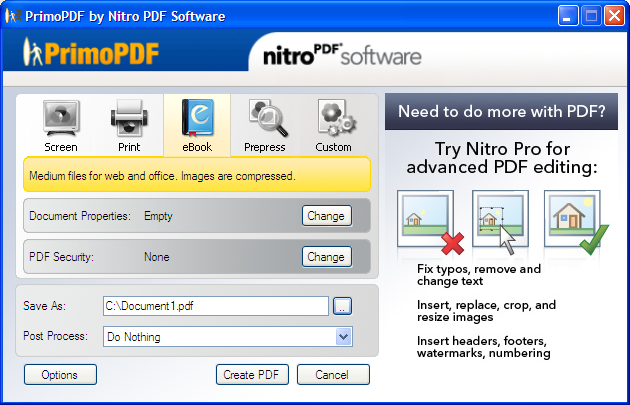
  6. After a few seconds, the PrimoPDF dialog will be displayed. There are several presets that you can use to create your document. Clicking on each preset will provide a description of the type of PDF file that is produced. Other options in the dialog include:
    1. Document Properties: You can specify such information as the title, author, subject and keywords.
    2. PDF Security: Allows you to specify a password that is needed to open the document, or permissions associated with the PDF file.
  7. primopdf dialog 300x192 How to Create a PDF for Free
  8. Once you have set your options, you can then specify the location in the Save As edit box. You can also tell PrimoPDF what to do after the creation of the PDF, such as view the PDF, or send it in an e-mail.
  9. When you are ready to create the PDF, click the Create PDF button. A new PDF document will be created in the location you specified.

I have tested this tool with various applications, including Microsoft Word, Excel, Notepad, and GIMP (an image editor). PrimoPDF was able to create a PDF document from each tool using the Print function. I wasn’t able to get it working with Internet Explorer, however, so I’m not sure you can turn a web page into a PDF.

Summary

If you are thinking about creating e-books or PDF files, then you may want to check out PrimoPDF. This tool allows you to create PDF documents from many different applications, such as Microsoft Word, as easily as sending a document to a printer.

Have Your Say

  • Do you currently create e-books, and if so, which PDF creator do you use?

You may also like:

Word Logo

Convert a Microsoft Word Document to PDF for Free

10 Free Windows Application You Should Install

10 Free Windows Applications You Should Install

Word Logo

Mircosoft Word: Can’t Create File

No thumbnail image

Free Software that can Replace Your Expensive Software

21 people had something to say about “How to Create a PDF for Free”:

Comments


  1. TechnicallyEasy or should I say Paul… I really like the presentation mate. I’ve never created a PDF document before. Guess I should learn now and use the skill when I have to. Cheers…


    • Creating PDF documents is not hard…if you stick with the basics. I haven’t created any PDF documents that included forms, just your standard documents.


  2. My employers are too cheap to buy me Adobe Acrobat so I can do this officially and they’re also too scared to give me administrative rights on my computer so that I can install free programs like this. So, I use free that do it for free like neevia.com. The only downside is that I can’t create forms and the people who *do* have Adobe Acrobat… don’t know how to use it. lol sorry for that Rant Paul, but you brought it out!


    • Rant away. I guess I’m lucky in that my employer gives us admin rights on our computers, but we aren’t really allowed to install free programs. I’ll have to check out neevia.com to see what they offer.


  3. I created once a computer repair e-book, it was very easy to follow. PrimoPDF is a good software not like Adobe but it does the work and for free what can we ask for?

    I usually don’t convert documents to PDF, I keep DOC’s with MIC most computer users has Office installed in there computers.


    • PrimoPDF probably will never have the same capabilities as Adobe, but as you said it is free. I don’t usually convert documents to PDF, but for some docs that I may put online, PDF may be the way to go.


  4. I do not have a website yet. However, I was wondering how to place by PDF document on a website?
    Your information really helped me.

    Thank you, Loretta


    • You can simply upload the PDF document, and then create a HTML link pointing to the file:

      A PDF file


  5. This was so cool! I needed to convert my resume into a PDF file so I could send it out better and it worked like a charm! And who can beat FREE with no computer viruses or being afraid that your computer will crash! Thank you so much


  6. Thanks for sharing! It works great, you made a valuable contribution


  7. This is wonderful. I just downloaded PrimoPDF and tried it out. It was so easy (even a caveman could do it). And it works wonderfully. Thanks a bunch, Paul.


  8. thanx..this is so easy…can u tell me how to convert a pdf file into a word or excel document…..it would b so nice if u could explain me…..thanx


  9. How can i create a PDF Doc with ‘Protected On Open’ Property.

    Pls help me……

    vissu


  10. Thanks a million–that was so simple and easy to do. A huge thank you again.


  11. Does this work with scanned in items? For example: Need to scan in old medical records, recipes, etc; decluttering my household. I would like to scan them in and save as PDF so I can reopen them on any device. Those new ‘neat desks’ look great, but way too expensive. Please help! Thanks.


    • Many scanners and scanning software support saving your scanned image directly to PDF. If not, then you can save as an image, and the open the image in the editor. From there you may be able to print the image to a PDF using PrimoPDF.


  12. Yes very good apllication. One problem though. I was in need of this as I have material that I needed to turn into a PDF, however I can’t take a chance that people can print it and also copy and paste from it. So I made sure I locked it and made it unprintable in the Primo setting when the file but it still prints and copy/pastes even though it has a big “secure” in the heading of the Tittle.


  13. Great article thanks, I have a pdf document, that I have to now edit and add things to… can I do this in the program you suggested? Thanks!

    Sherri-Lee
    Sherri-Lee recently posted…Changes to your Facebook settings means you might not be getting all your friends updates…My Profile


  14. Paul thanx a lot that was really good & easiest way to create the pdf file, I love that thanks a lot.


    • No problem, I’m glad you like it.

Do you have something to say? Let everyone know!

Commenting policy: All comments are moderated for spam. You must use your real name and not your website name or keywords. If a comment is deemed to be spam, then it will be deleted or edited. Links to your website within the comment body is not permitted, but you are free to use CommentLuv to add a link to your latest post. If you wish to add a link to your website, you can always contact me about submitting a guest post.


CommentLuv badge
This blog uses premium CommentLuv which allows you to put your keywords with your name if you have had 5 approved comments. Use your real name and then @ your keywords (maximum of 3)

Previous Post:

Next Post: