Via E-mail:

Making technology easier to understand.

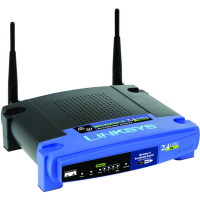
How to Reset the Linksys WRT54G Wireless-G Router

You are currently browsing comments. If you would like to return to the full story, you can read the full entry here: “How to Reset the Linksys WRT54G Wireless-G Router”.

145 people had something to say about “How to Reset the Linksys WRT54G Wireless-G Router”:

Comments

  1. aamer k jafry -

    thanks i did it , thanks again

  2. amateur -

    i can“t reset my router, i press reset button but no returned to the factory default settings, please helpme!!!!!!!!!!

  3. Tesfom -

    This is Tesfom. I have Smart MT880 Huawei modem and WRT54GR Linksys Router. I used to 192.168.1.1 to go to the address of WRT54GR Router configuration page. I resetted the WRT54GR two times. After reset when I type 192.168.1.1, I get the configuration page of Smart MT880 modem.
    Is there anyone who can help me how to get now the configuration page of the WRT54GR router please ?

  4. ACE -

    Do i have to reset my router because it cant detect internet connection. But when i check my modem it working good and has internet connection. Whats should i do?

    Hope to get infos from anyone.

    • Matt -

      Well in response to your router issue, first try unplugging both modem and router and wait 30 sec, plug in the modem first, then secondly the router once the modem says its online, if that does not work try again but reboot the computer in the process. What you are attempting to do by this is reasign a new ip/connectivity, this actually happens frequently so just be prepared for it as your first step.

    • ashkat -

      did you find a solution?

  5. Archive -

    Ya I need help my WRT54G is doing nothing at all I tried resetting and nothing I tried the web thing and well I can’t access anything at all I can’t get on the web???

  6. Mat -

    HELP! My modem works (connects succesfuly pc to net), i can connect to the router(wireless-g linksys wrt54gl v1.1) but via the router it doesen’t. Sugestions?

  7. Ryan -

    My computers/laptops aren’t seeing my router.It’s just crossed off.I did a hard reset,unplugged the power for a couple of mins and plugged it back in.Restarted the computers/laptops.Still doesn’t show my router.Please help.Thanks

  8. Cheryl -

    Does this also reset to the original IP address…..192.168.1.1? I changed mine and cannot remember what I changed it to. duhhh!

  9. body machine -

    Do i have to reset my router because it cant detect internet connection. But when i check my modem it working good and has internet connection. Whats should i do?and has also an internet its working already from the modem an the router to the pc ,the only problem is,i can’t reach the internet through a web browser,there all cannot be displayed. all of the website….

    Hope to get infos from anyone.

    • Paul -

      You can try unplugging the router, waiting for 5 seconds and replugging it back in. Sometimes my router will just lose the connection, so I just unplug and replug the router and it seems to pick up the settings from my ISP again.

      Try logging into your router and find the page that displays the IP address from your ISP. Ensure that your router is receiving the IP address from your ISP.

  10. ashkat -

    So I’m having a similar problem. I recently restarted my router for the first time because I had forgotten my password, and wasn’t able to connect my ipod wifi unless I had it. So I had to reset it well once I reset it and changed my password and everything. My router would connect to my pc but it wouldn’t connect to the internet. Now the website won’t come up and the router won’t connect to my pc or the internet. The only way I can get internet connection is if my laptop is connected directly to the modem. I don’t know what else to do, my warranty is up so I can no longer get free tech support and I really don’t want to spend any money on something that may or may not help. PLEASE help me. I live in a house with four other people I REALLY don’t want to have to sit in the kitchen/dining room in order to do my school work and browse the internet!

    Thanks.

    • Paul -

      When the router is connected to the modem, is it being assigned an IP address from your ISP? You can check this in the administrative pages of your router.

      • ashkat -

        The weird thing is it will no longer let me go to the router page, it did earlier when I first reset it. But now it’s saying: “Failure To Connect To Web Server” (in Firefox). I can go to any other website except for that one, but I could before now. It just all of a sudden stopped working. This is the page —> (http://192.168.0.1/)

        • Paul -

          When you connect your computer to the router using a cable, what is the default gateway that is assigned to your computer?

          If you are unsure how to get this, please read How to Get the IP Address of Your Router for more information.

          • ashkat -

            default gateway is 192.168.0.1 & when i enter that into my browser it leads me to my HN9000 System Control Center.

            • Paul -

              I’m not familiar with the HN9000, but it doesn’t look like your computer is using the router as your gateway to the Internet. Try this: disconnect the router from the modem, and connect your computer to the router. Try accessing the IP address of your default gateway again to see if you get your router.

              • ashkat -

                My computer is connected to my laptop right now. Do I need some sort of plug to connect my router to my laptop? If so, I don’t have one. I don’t believe one came with the router.

                I’ve tried restarting the router several times, I’ve even tried clearing my cache & history on my pc. I’ve also rebooted my laptop as well. I don’t know what else to do. I’ve looked through several forums already and I’ve found others who have has very similar problems but I can’t seem to find a solution :(

                Thanks anyway.

                • Paul -

                  How is your computer connected to the modem? If it is connected with a network cable, then simply use that network cable to connect your computer to your router temporarily.

                  • ashkat -

                    Ah, okay! So I’ve now connected my laptop to my router. . .what do I do now? And is there any particular port I should plug it into? There’s 1-4 & one that says internet.

                    • Paul -

                      Plug it one of the 1-4 ports, but not the Internet port. The Internet port is what you plug your modem into. Once you plug your computer into your router, the default gateway will then point to your router. You can then access the admin pages of your router, so you can configure it.

                      Once the router is configured properly, connect your modem into the Internet port of your router using the cable you just disconnected from your modem.

      • ashkat -

        whoops, the page is (http://192.168.1.1) it no longer works. But (http://192.168.0.1) is my internet system control center, and it works fine.

Trackbacks/PingBacks

    Do you have something to say? Let everyone know!


    CommentLuv Enabled