People love smart phone devices for professional and personal reasons. Beyond making communication convenient, manufacturer galleries offer an array of applications, helping users do everything from generate and maintain a grocery list to tracking health metrics during a morning jog. BlackBerry, facing fierce competition from iPhone and Android phones, offer users a variety of professional and personal applications. BlackBerry’s new BBM application, with video conferencing abilities, excites scores of faithful fans.
Organization comes natural to some, yet numbers of people need help introducing structure in their lives. Smart phones are not for communication only, but serve as microcomputers, aiding us with a number of tasks and responsibilities. ‘Life hacking’ has become a popular term within the tech industry, flirting with the notion of leading better and more efficient lives. BlackBerry applications facilitate the process. The following applications help BlackBerry customers and others take ownership of their organization.
Evernote
Evernote is a digital worker’s lifesaver, maintaining notes, audio clips, and media files all in one place, acting as a cloud-based file manager. Additionally, it’s useful offline as well; take a picture, record an audio description, and save the media file straight to Evernote for late usage.
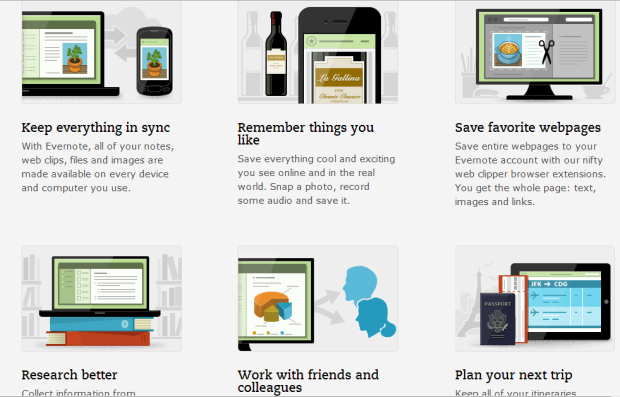
Evernote is great for research, enabling users to clip images, sections of text or entire pages of Web sites, maintaining URLs or bookmarking domains of interest. Keep organization a part of every task; catalog text and information by folders and subfolders.
Work with friends and peers seamlessly. Emails, phone calls, and faxes are taxing on business time; additionally, information gets lost in translation. Save time and resources by passing and editing information more efficiently.
Password Keeper
Security threats and online impersonation run rampant. While the tech age has introduced so many positives, incidents of hacking and identity theft are negative derivatives. It seems each Web site or online platform demands login information, forcing users to maintain families of passwords, making it too easy to lose track of password information, have info stolen, or suffer compromised accounts.
Password Keeper allows users to store all of their password information in one place. Rather than maintain and remember countless passwords, keep things simple by remembering one. Records are encrypted; threat of hacking or identity theft is eradicated, giving peace of mind to users.
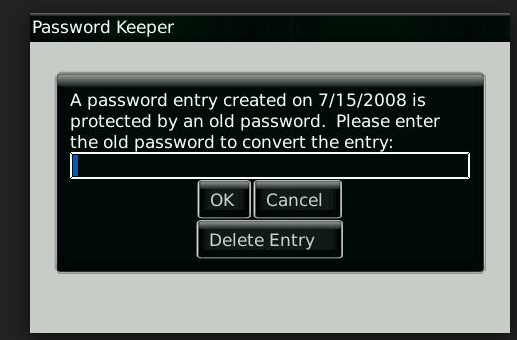
Create, edit, and delete records. Do you have passwords kept from a previous BlackBerry device? Password Keeper allows for easy transfer. Intuitive navigation, strong password suggestion and quick actions are just a few reasons BlackBerry users enjoy better organization and less anxiety.
Find My BlackBerry
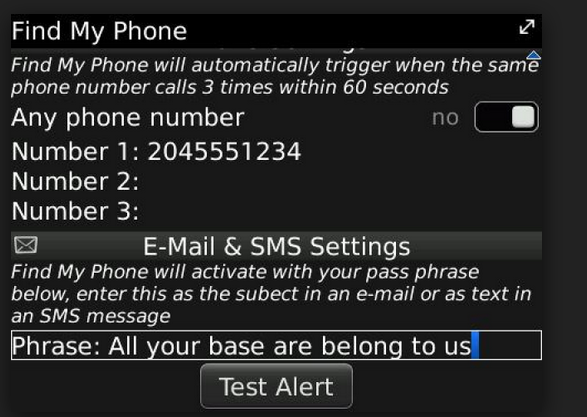
How many times have you frantically searched your automobile, office, or living space for a misplaced phone? Additionally, the rising costs and popularity of smart phones inspire increased theft. The frequency of theft in large cities remains while police admit possibility of recovery is low. Those who misplace, lose, or have a BlackBerry stolen are shortly out of sorts, possibly having business and personal lives in disarray due to the nature of information stored within the phone. The more we use phones for a variety of purposes, the more we rely on those devices.
Trace your BlackBerry phone to the corners of the Earth, knowing the app leaves no stone unturned in providing intelligence of the phone’s location. Ensure you’re protected from disorganization and mishaps, downloading Find My BlackBerry, enjoying the peace in knowing such a precious possession is well protected.
Talking Clock
‘All in a day’s work’ is a broad term. How much does one perform in one day? Surely, planning and organization help get more done per day. The Talking Clock application allows for interval shifts; segment a day in ‘working cells,’ filled with short breaks, long periods of work, and leaving periods open for meetings and immediate needs.
Choose between a male or female American English voice. Hours and minutes are the cogs that comprise proper organization. Talking Clock allows for a hands-free partner in keeping track of time and using it more efficiently.
BBM Comes to Town
BlackBerry’s BBM app is an ace up the company’s sleeve. Despite being direct competitors, Apple and Android allow its consumers to use BlackBerry’s popular application. The app, officially released at the end of September, with people all over the world getting access along with BlackBerry’s newest update. While similar applications function like the BBM app, BlackBerry’s is suited with the company’s efficiency, allowing for easy video conferencing along with the ability to pass along multimedia pictures during the call. The BBM app, coupled with BlackBerry’s newest smart phone, gains the brand mainstream favor.
BlackBerry Z10
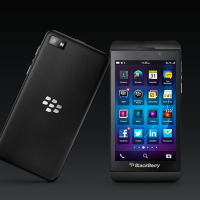
The BlackBerry Z10 is turning heads with its trove of new features and benefits. The hub feature allows for easy navigation, making the home screen only a swipe away regardless of present application use. Additionally, the keyless keyboard, with autosuggest and molding capabilities, quickly learns users’ habits, making typing easier and intuitive.
Moreover, the front and back camera lenses offer editing capabilities, capturing images before and after the ‘main’ shot, ensuring a perfect picture each time. The Z10 comes equipped with BlackBerry’s new messaging function. Before, messaging was akin to instant messenger, keeping BlackBerry owners connected, but now, the application allows for video conferencing, ability iPhone and Android users desire, especially given its free-of-charge price tag.