Server Header Responses 101 [Infographic]

When you request a web page online there may be times where you may see an error page appear on the screen. While it can be frustrating to see such a page, mainly because that means the content you were looking for won’t appear, the error number that appears actually has meaning to the owner of the web site.

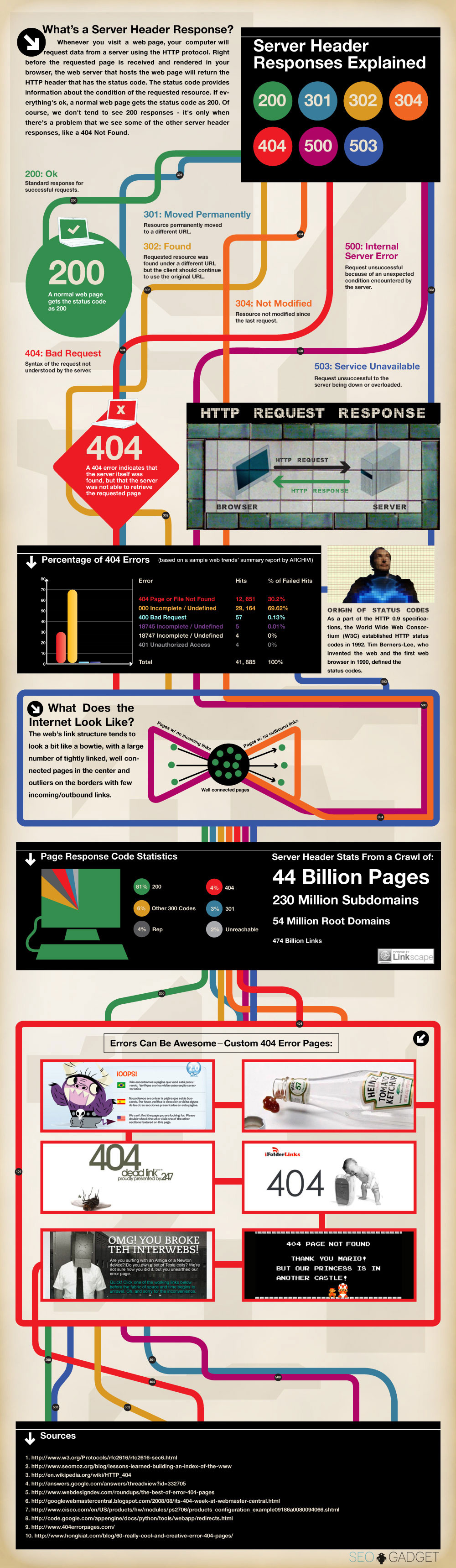
There are many different status codes defined for requesting and sending data online, and all pages sent from the Web actually return one of several different status codes.

Server Header Information

Each request for data on the Web provides a response from the Web server. Within that response from the Web server is information regarding the type of response that is sent back to the client.

Such information included is the type of data being sent, such as a HTML Web page, a PDF document, or a JPEG image, the size of the data being sent, and the status code of the request.

The status codes have been defined since the beginning of the Web, and are well-known to those involved in the maintenance of Web sites. There are many common types of status codes, and you probably have seen many yourself. Codes such as 404 and 500 are common when a page cannot be found or there was an error processing the request on the Web server.

Below is an infographic that shows different server header responses that are common, and some of them you have probably seen before.
Server Headers 101

Infographic by SEOgadget.

PG

About Paul Salmon

Paul Salmon is the founder of Technically Easy. He is a an experienced PC user, and enjoys solving computer-related problems that he encounters on a regular basis.

Facebook | Twitter | Google+

Design , ,

5 Comments

  1. Posted June 29, 2012 at 7:09 am | Permalink

    that’s nice information sharing, I wasn’t aware of all this error codes.
    Twitter:

  2. Jesse Brauning
    Posted June 26, 2012 at 5:22 pm | Permalink

    Very nice infographic Paul! You are right, we are visual beings more than anything and they don’t say “a picture is worth a thousand words” for nothing!

  3. Posted June 26, 2012 at 3:50 am | Permalink

    I have never used infographix, how can it help me in enhancing my business?
    Twitter:

    • Posted June 26, 2012 at 8:04 am | Permalink

      Infographics are great for assisting in explaining a particular topic. Graphics have always been easier to understand because humans tend to respond better to visual images than straight text. IN terms of using it for your business, you can possible use it to explain a complex topic to your clients.

    • Martin from Web Designing
      Posted November 11, 2012 at 10:43 am | Permalink

      A good question :) Infographics are made off images which can be easy understood by people. However, the provided infographics above isn’t top quality (it is a bit complex), it is created to make the Server Response post more attractive, and it actually does its job. Thanks
      Twitter:

Post a Comment

Your email is never published nor shared. Required fields are marked *

*
*

You may use these HTML tags and attributes <a href="" title="" rel=""> <abbr title=""> <acronym title=""> <b> <blockquote cite=""> <cite> <code> <del datetime=""> <em> <i> <q cite=""> <strike> <strong>

This blog uses premium CommentLuv which allows you to put your keywords with your name if you have had 5 approved comments. Use your real name and then @ your keywords (maximum of 3).

Subscribe without commenting

  • About Me

    I am Paul Salmon, an avid technology fanatic who is always learning new things. My goal is to inform and help others with technology.

    With this blog I try to cover various topics on this blog to cover a broad range of topics.

    Read more...

  • Email:

  • Advertise with IZEA Media
  • Sponsors

  • Recent Posts