What to Look for in a Digital Camera

Whether you are looking to upgrade your current digital camera or invest in your first digital model, there are many factors to take into consideration before making the purchase. Today, digital cameras have a wide range of features, sizes, memory types, and sharing capabilities.
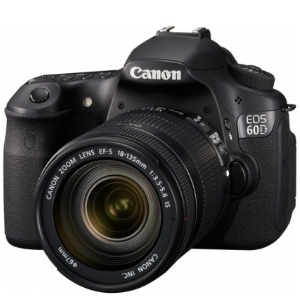

Canon EOS 60D DSLR

Key Features

When comparing digital cameras, there are certain considerations that you should look at first. It’s likely that one of the first pieces of information you will learn about a camera is its megapixels. Megapixels are one of the keys to the quality of the pictures that you will be able to produce.

For example, if you would like to be able to print 8” by 10” prints, you will need a minimum of 5 megapixels, or 5MPs. Today’s digital cameras typically have a minimum of 5MPs, and many cameras on the market have as high as 12 MPs.

The next feature you should look for is the camera’s zoom. Cameras have optical and digital zoom, but optical zoom is the important measurement. Look for a camera with at least three times optical zoom; professional cameras have 10 times optical zoom. The higher the optical zoom means the more range that you will have to zoom in without losing quality.

Size and Screen

Consider how you plan to use your camera when looking at its size. Ultra-portable digital cameras can be small enough to fit into your back pocket. If carrying your camera everywhere is your goal, these ultra-portable models may be ideal. However, ultra-portable camera can be expensive and may be difficult for some people to use.

Screen features can be very important for ease of use. A good camera has a bright, glare-free LCD screen that is large enough for comfortable viewing of your pictures and setting options. Recently, more cameras have been coming out with touchscreens and dual view screens that allow you to see what pictures you are taking from both the front and back of the camera.

Memory and Sharing

Finally, consider your memory and sharing needs. Digital cameras have on-board memory, which is often small, and removal memory cards. Most types of memory cards have similar features and are easily upgradable.

For taking pictures, you will likely need at least 1GB of memory; for videos or high quality pictures, more memory may be needed. Lastly, consider the camera’s sharing abilities. While the memory card can be removed and read, it can be more convenient to have a camera that can connect to your computer with a USB cable.

PG

About Paul Salmon

Paul Salmon is the founder of Technically Easy. He is a an experienced PC user, and enjoys solving computer-related problems that he encounters on a regular basis.

Facebook | Twitter | Google+

Cameras

11 Comments

  1. Posted May 21, 2012 at 5:38 am | Permalink

    Hi I enjoyed your site. extremely awesome

  2. Posted November 17, 2011 at 9:10 am | Permalink

    If you’re referring to compact cameras,
    you should consider the size of the camera,
    its image quality, as could be compared to others,
    its low-light capabilities and its lens width.
    The intuitiveness of the camera’s controls
    is subjective and could different for anyone.

    -eyalg

    • Posted November 17, 2011 at 3:23 pm | Permalink

      Thanks for some points to think about Eyal. The image quality of compact cameras is important as many smaller cameras may not be able to produce good images as others.

  3. Posted June 30, 2011 at 12:48 pm | Permalink

    Key feature? I would look at the sensor, ISO and many more. We couldn’t just see on ONE key feature, there’re a lot of em actually.

    • Posted July 4, 2011 at 8:39 am | Permalink

      ISO is important as it can help take low-light photos. When I read reviews I usually look at the quality of the photos at the higher ISO levels as it helps to determine how good the sensor is, as well as how good the noise reduction performs.

  4. George
    Posted May 17, 2011 at 5:25 pm | Permalink

    Not long ago I found out that professional digital cameras can make a difference. My wife kept saying for months that we should buy one. I wasn’t really into it but we bought one two month ago for our trip to Europe. Just little over $150 and now I understand what quality really means. Super pictures, great memories.

    • Posted May 17, 2011 at 6:07 pm | Permalink

      While point-and-shoot cameras have increased in quality over the years, the DSLR cameras are still the best for picture quality. The larger sensors in a DSLR makes a huge difference, especially at the higher ISO levels.

      In the end, however, really great photographs starts with the photographer.

  5. Posted May 14, 2011 at 1:03 pm | Permalink

    A lot of people tend to think it is all about the how many megapixels a camera can do. As you says optical zoom is also something to look out for. Another thing to look out for is the memory speed. If you buy the memory to cheep you might need to wait for the camera save the first picture and before you are ready to take the next the kodak moment has gone.
    Twitter:

    • Posted May 15, 2011 at 7:32 pm | Permalink

      I agree with the optical zoom. Many manufacturers seem to like to advertise the digital zoom, which is really misleading. As for the memory, the SD cards have a class number, with the higher the number the faster the memory. For my digital camera I have a class 4 card, but for my HD camcorder I use a class 10.

  6. Posted May 11, 2011 at 2:38 am | Permalink

    I make sure that the camera is user-friendly. I hate cameras that are not easy to use.

    • Posted May 11, 2011 at 8:08 am | Permalink

      Many people do. The good news is that cameras are getting more user-friendly each year by doing a lot of the work for you.

Post a Comment

Your email is never published nor shared. Required fields are marked *

*
*

You may use these HTML tags and attributes <a href="" title="" rel=""> <abbr title=""> <acronym title=""> <b> <blockquote cite=""> <cite> <code> <del datetime=""> <em> <i> <q cite=""> <strike> <strong>

This blog uses premium CommentLuv which allows you to put your keywords with your name if you have had 5 approved comments. Use your real name and then @ your keywords (maximum of 3).

Subscribe without commenting

  • About Me

    I am Paul Salmon, an avid technology fanatic who is always learning new things. My goal is to inform and help others with technology.

    With this blog I try to cover various topics on this blog to cover a broad range of topics.

    Read more...

  • Email:

  • Advertise with IZEA Media
  • Sponsors

  • Recent Posts