
There may be times where you hare having trouble with your WRT54GL router, which may require you to reset the Linksys WRT54GL wireless-G router. There are two methods of performing such an action, so which method you choose is up to you.
I recently wrote a post outlining the steps needed to secure a Linksys WRT54GL Wireless-G router. Now I will detail how you go about resetting the router if you do need to revert back to the factory defaults. I will explain the two methods you can use to reset the wireless router.
Note:
Resetting the router to the factory defaults will delete any changes you have made to the router, including any security settings. This should be used as a last resort.
Two Methods to Reset the Linksys WRT54GL Wireless Router
Reset Button to Physically Reset the Linksys WRT54GL Router
The first method involves simply pressing a button located on the back of the router. The button should be labeled Reset and can’t be pushed in by a finger. The image below (courtesy of Linksys), shows where the button is located.
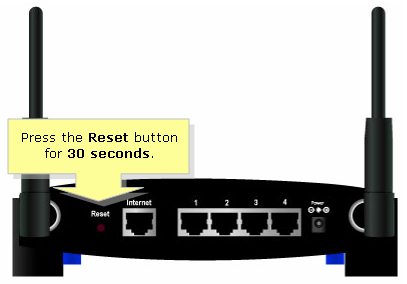
To reset your router, use the following steps:
- Press the reset button for 30 seconds. This can be done by using an object with a small tip, such as an unfolded paper clip.
- Open up your Web browser and enter 192.168.1.1 in the address bar.
- For the login, leave the ID blank and enter admin as the password.
At this point, all settings that you had previously saved have now been deleted. You will now need to re-secure your WRT54GL Wireless-G router.
The router has now been reset. Follow the steps in Securing Linksys WRT54GL Wireless-G Router to secure your router.
Through the Web Administration Pages
The second method involves logging into the Web administration pages of the router. If you can’t remember your password, then use the first method explained above. To reset the router back to the factory defaults, use the following steps:
- Open your Web browser and enter the IP address of your wireless router. The default IP address is 192.168.1.1.
- Enter your user ID And password when prompted. If the password hasn’t been changed, then the default password is admin.
- At the top of the Web page, click Administration and then Factory Defaults.
- Beside Restore Factory Defaults, click Yes.
- Now click the Save Settings button at the bottom of the Web page.
Ensure you follow the steps outlined in Securing Linksys WRT54GL Wireless-G Router to secure your router.
After following the above steps to reset the Linksys WRT54GL router, the router should be reset to the factory defaults.