
Google Analytics is probably the most popular free traffic statistics tools that is used by web site owners. It provides a wealth of information about visitors to a site, and can easily be used to help manage a site.
With all the information that is available by Google Analytics, it can be confusing as to find out where visitors from referring sites land on your page. A single referring site can send visitors to your site through several different pages, and it may help to know the pages that those visitors opened from the referring site. This post explains how you can easily do this with a few clicks of your mouse button.
Viewing the Landing Pages
![]()
While sites can send visitors to your site through several different pages, it may help to understand which page is viewed when a visitor does come to your site. In Google Analytics, you can do this using the following steps:
- Click the “Traffic Sources” link on the left side, and then select “Referring Site”.
- Click the link to one of the referring sites. A list of the pages that sent visitors to your site is displayed, as shown below.
- In the header row of the first column of the table of referring pages you will see two dropdown lists – one has “Referral Path” selected, and the other has “None” selected. Click the “None” dropdown to show a list of other values you can display.
- From the list, select “Landing Page”, as shown below.
- The referral path table will change to show the landing pages associated with the referring pages, as shown in the image below.
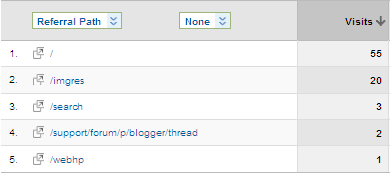
Google Analytics - Referral Paths

Google Analytics - Referral Paths With Landing Page
By using the above steps, you should now be able to associate the landing pages from your site with the referring pages from another site within Google Analytics.


on October 1, 2010 at 10:02 am
This is a really interesting tip. I’m heading over to check these in my analytics stats.
Cheers!
Sachin recently posted…Show today’s traffic in Google Analytics
on October 4, 2010 at 8:27 am
I’m glad you found it interesting. Thanks for stopping by.
on October 2, 2010 at 3:00 am
Thanks for this useful information. I wondered where I could find out where all my visitors come from as my WP site stats doesn’t tell me everything. Will bookmark and go check later. Thanks again. You techies are geniuses in my book

Patricia Perth Australia
Patricia recently posted…Growing Lavenders-Your Favourite Gardening Tool
on October 4, 2010 at 8:27 am
I’m glad you found it useful. I also use WP site stats – which do provide some interesting stats also.
on October 6, 2010 at 11:34 pm
I now following you on twitter so hope you let us know on there when your next post published. Thanks
Patricia Perth Australia
Patricia recently posted…Growing Lavenders-Are You a Purist
on October 3, 2010 at 2:54 am
Thanks for the info, I was using StatCounter to monitor all my websites stats, but I’m sure Google analytics will be way better and more accurate.
Sayed recently posted…To Do List After A Fresh WordPress Install
on October 4, 2010 at 8:31 am
StatCounter is also a popular choice, which I use. I find some stats packages have different stats than others, and those additional stats can come in handy. Google Analytics, by far, is one of the most detailed free analytics tool available.
on October 3, 2010 at 2:58 am
So Sorry for the double post, I accidentally hit submit while I was doing spell check and I stopped it using the “Stop” built in the browser and when I was done I hit submit but I didn’t realize it had already submitted the first one.
Again I truly apologize for the previous double post.
Thanks.
on October 4, 2010 at 8:26 am
No problem. I removed the first one as the second seemed to have been edited.
on October 3, 2010 at 7:08 am
Hey Paul, this is some powerful stuff here. I can play with this all day long. LOL
I get most of my referral traffic from my old blog so it’s really cool to see exactly which posts are sending the traffic. I found some posts that are so old that I never would have suspected. But people are really clicking on the banner from the sidebar. Now I can go back and add some backlinks from within the posts. That should keep me busy for a few days!
The funny thing about this is that even though my old blog is on WordPress.com and I haven’t updated it in 2 months the traffic is coming directly from Google and other search engines. I’m so glad that I didn’t listen to people who told me I was wasting my time on WordPress.com – it was so worth it! I still love that blog…
Thanks so much!
Ileane recently posted…Amplify What You Find On The Web
Twitter: Ileane
on October 4, 2010 at 8:34 am
When I moved Technically Easy from Blogger to WordPress a few years ago, I kept the Blogger blog alive, but I just changed the look and created some new posts to point to my new blog. I still get regular traffic each day from various posts on my Blogger blog, in like you, I haven’t updated that blog in months.
I guess once you rank well in search engines, you can enjoy the traffic for quite a while.
on October 3, 2010 at 11:30 am
This is a good information. I have never tried to see the landing page because my blog is 6 months old but I will keep track of those visitors. Thanks for sharing.
Pankaj Gupta recently posted…Avoid Phishing Attacks and Scams Using McAfee URL Shortener
on October 3, 2010 at 2:10 pm
Ya me too, my blog is only 1 week old, but its good to learn this at this stage because now I can keep track of which pages really get the most traffic.
Thanks for sharing.
Sayed recently posted…To Do List After A Fresh WordPress Install
on October 4, 2010 at 8:38 am
Exactly. Monitoring your traffic is important to managing your blog.
on October 4, 2010 at 8:37 am
It is never too early to start monitoring the traffic for your blog. It can help you plan out your traffic strategy going forward.
on October 6, 2010 at 12:51 pm
Paul,
It’s always a plus to keep up with your visitors and your site performance.. I use Google analytic and a few others to manage and see all of my traffic.
on October 7, 2010 at 8:22 am
From what I can tell, Google Analytics is probably the most popular choice for keeping an eye on traffic. Thanks for stopping by.
on October 22, 2010 at 12:36 pm
Great discussion! You’ve noted all important points we need to know to work with google analytics more effectively. I’m glad that Google provide us this free service that can help site owners improve their blog. In addition, knowing where you get your visitors can also improve your strategy too.
Cole Stan recently posted…Be Thoughtful And Give Unique Personalized Wedding Gifts
on October 22, 2010 at 2:11 pm
Google Analytics can be confusing at first, but once you know where to look for information, it becomes much easier to understand.
on January 20, 2011 at 10:40 pm
why does my account haven’t “Referral Path” ?