I recently mentioned that I had converted to WordPress from Blogger. I also mentioned that the conversion was easier than I thought it was going to be. While I found it easy, some may still not be comfortable converting to WordPress from Blogger.
To ease any fears of converting, I decided to write several posts about converting from Blogger to WordPress. I will break down the conversion into several parts and discuss what actions are required to complete each part. In the end, I hope to help others make the conversion quickly, and easily.
Getting Started
Before moving from Blogger to WordPress there are a few things that you will need:
- A local copy of WordPress for developing and testing. Although not necessary, I highly recommend installing WordPress on your local computer.
- A domain name that users will type in the browser to view your blog.
- A host to house your blog.
I will not re-write what others have done, but will rather point you to the resources that I had used to convert my Blogger blog to WordPress.
Installing WordPress on Your Local Computer
WordPress can seem complex, especially compared to Blogger. There are many files that make up a WordPress blog, and understanding how it all works takes time. This is one of the reasons that I suggest you install WordPress on your local computer.
Installing locally allows you to play around with WordPress without affecting your real blog. A local copy will allow you to install plugins, write and publish posts, try out new themes, and learn how WordPress works.
To install WordPress locally I suggest you follow the steps outlined in Test Drive WordPress Themes In Windows.
Once WordPress is installed, login into your administrative pages by using the following steps:
- Open your browser and navigate to: http://localhost/wordpress/wp-admin.
- Type in your user name and password and click Log In.
Once you have logged in you will see the Dashboard that displays a summary of information about your blog. Feel free to look around the administrative panel. Remember you are working on you local machine, so if you muck something up, you can easily start again.
A good resource to refer to when you have questions is the WordPress Codex. All information regarding installing, and using WordPress can be found there.
Importing Your Blogger Posts
One question you may have about moving to WordPress from Blogger is how to import your Blogger posts and comments. WordPress allows you to easily import your Blogger data into WordPress without affecting your Blogger blog. WordPress simply makes a copy of your data from Blogger, it doesn’t change anything in Blogger.
To import your Blogger posts and comments:
- Log in to your administrative pages in WordPress (see above for instructions).
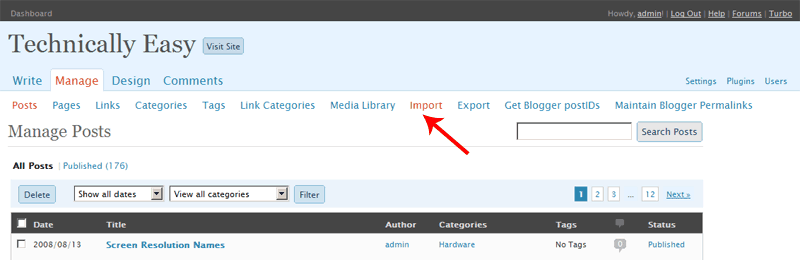
- At the top menu, click Manage.
- From the submenu, click Import.
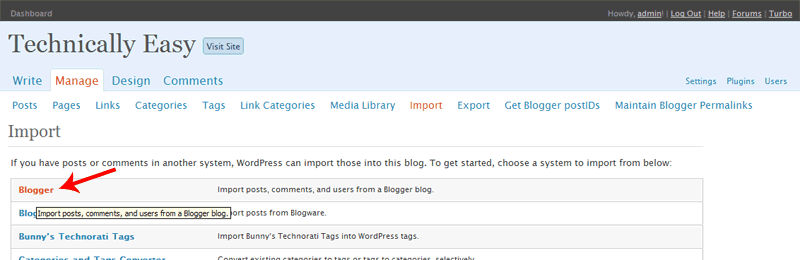
- In the list, click Blogger.
- Follow the directions on the screen to import your posts.

Click to enlarge (16KB)
Click to enlarge (16KB)
Click to enlarge (18KB)
As mentioned, WordPress won’t change anything in Blogger, it will only retrieve your posts and comments. It will display a status bar of how much it has done. If you write another post in Blogger, you can import the new post and any comments into WordPress at any time. Remember you are still working locally, so if you make a mistake you can simply delete the posts and re-import them again.
You should continue to explore WordPress to become comfortable with using it. My next post will discuss domain names and how I used them to manage both my Blogger and WordPress blogs at the same time.