Broadband, or high-speed, Internet connection is what many users currently use in their home. Along with high-speed Internet, many users may also use a router to allow multiple computers to connect to the Internet. This post will describe how a router is used to connect multiple computers. To make it easier to understand, I will use where you live as a comparison to how your computer is connected to the Internet.
What is an IP Address?
IP addresses are a series of numbers in the form: nnn.nnn.nnn.nnn, where nnn is a one to three digit number. An IP address is unique to an individual computer on a network, similar to how your home has a unique address. For an Internet connection, an IP address is supplied by your Internet Service Provider (ISP). In some cases, your ISP may provide you with more than one IP address, which allows you to connect multiple computers. As you will see later, however, you can still connect multiple computers with a single IP address.
Connecting a Single Computer
Connecting a single computer to your high-speed Internet is very simple to do. Simply connect a network cable into your modem, and then into the network card in your computer. Your computer will then be assigned an IP address from your ISP. For example, if your ISP assigned you the IP address of 24.24.50.17, then your computer will have that IP address. The figure below shows the connection.
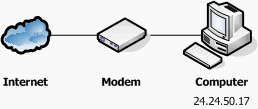
When you make a request to a server, such as for a Web page, the Web server knows which IP address made the request. The information is then sent through the Internet and back to your computer. This is similar to when someone sends you mail to your home. The address on the mail allows it to be delivered to your home and not somewhere else.
Connecting Multiple Computers
How can multiple computers connect if only one address is assigned? When you make a request for a Web page, how does it know which computer requested that page? Let’s take our home analogy one step further. Let’s say instead of living in a house, you live in an apartment. When someone sends you mail, they not only include your address but also an apartment number. This number is internal to your apartment building and every apartment has its own unique number. Similarly, multiple computers can connect to the Internet if they each had there own unique local IP address. This can be handled by a router.
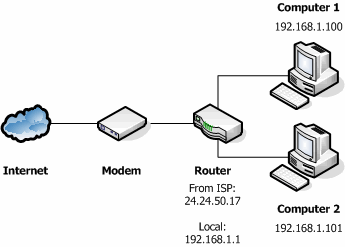
A router is a piece of hardware that connects directly to the modem. Each computer is then connected to the router, instead of the modem. Now instead of your computer having the IP address supplied by your ISP, your router now is assigned that IP address. This is similar to your router acting as the apartment building.
The beauty of a router is that it can assign its own local IP addresses. When you connect a computer to the router it now receives one of the IP addresses assigned by your router, similar to how each apartment has it’s own number. Now when you make a request for a Web page, the request is sent using the same ISP address, but this time it is assigned to the router. When the Web page is returned, the router receives the request, and sends it locally to the computer that requested the page.
The router also has its own local address that is similar to the local IP addresses of the computers. So now the router has two addresses assigned to it: an external one provided by your ISP, and a local one provided by it. This allows the router to connect to both the Internet and the local network. The figure below shows how the router and computers are connected, and the IP address assignment.
Note: The 192.168.xxx.xxx address are special IP addresses reserved for Local Area Networks (LANs).
Managing a FTP or Web Server on Your Network
Let’s take a look at this scenario. You have a router connecting multiple computers to the Internet. But now you want to create a FTP or Web server. No problem. You setup the necessary software on a computer on your network, told someone outside your network the local IP address of your FTP server and they try to connect. They then discover that they can’t connect. Why? Its similar to someone mailing something to you by just specifying your apartment number and no address.
The IP address assigned to your computer is local to your network. You can connect to that computer from within your network, but not from the Internet. You will need to use your ISP-assigned IP address (the one assigned to your router) to have someone from the Internet connect to your FTP server. The problem is that your router is assigned that IP and not your computer, and since an IP address must be unique, how can two computers have the same IP? The answer: they can’t, but they don’t need to.
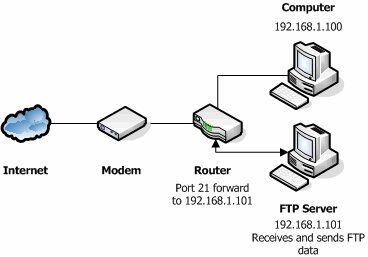
Routers have the ability to forward information on a port to a specific computer. A port is a numbered channel that data can be sent through on a network. You cannot physically see it as it is a virtual channel used extensively in networking for sending/receiving data. For FTP servers the default port is 21; however another port can be used.
Open your router setup and look for the port forwarding option. Specify the internal IP address of your FTP server and the port number and then save that information. Now when a user tries to access your FTP site, they must use the ISP IP address that is assigned to your router. The router will then notice that the data is being sent on port 21 and then forward it automatically to your FTP server. A Web server can be setup the same way, but its default port is usually 80. The figure below shows the router with the assigned IP address of 24.24.50.17, and the FTP server with the local address 192.168.1.101.
Note: By default a router will dynamically assign IP addresses to the computers connected to it. This means that the first computer to connect to the router will get the first available IP address, and the next will get the second, and so on. If you manage an FTP server, it may be easier to assign a static IP address to the computers to ensure that the FTP server always has the same IP address.
Summary
This post described how to connect one or more computers to one Internet connection. It is important to remember the following:
- If you have one computer connected directly to the modem, then that computer will be assigned the IP address from your ISP.
- When using a router, the the router will be assigned the IP address from your ISP. Any computers connected to the router will be assigned a local address by the router.
- A router will have the ISP IP address and a local IP address. This allows it to connect to both the Internet and your network.
- When setting up a computer as a FTP, Web, or other server to communicate over the Internet, it is important to use the router’s IP address to access your server. You will then need to forward the necessary port to your server.